2026.1 Release Notes
Last updated: July 15, 2026
For a list of release dates and Sisense's end of support schedule, see Sisense Version Release and Support Schedule.
For information about the Sisense gradual rollout process, as well as an explanation of how the versions and release notes relate to content added during the rollout, see Sisense Gradual Rollout Process.
Versions Documented in these Release Notes
Regarding Salesforce Security Updates to the "Use Any API Client" Permission:
-
For customers using Sisense connections to Salesforce, it is important to note a significant Salesforce change and steps that you may have to take for continued correct functionality. See Salesforce “Use Any API Client” Permission Changes: Sisense Impact & Migration Guide.
Regarding Upgrading:
-
Version L2025.4 Service Pack 1 contains an important fix. Therefore, it is strongly recommended to upgrade to SP1 (or newer, when available).
-
Customers currently running Sisense versions older than L2025.2.0.249 cannot directly upgrade to versions L2025.3 or newer. You must first upgrade your Sisense installation to version L2025.2.0.510. Only after completing this intermediate upgrade can you proceed to version L2025.3 or newer. This important change is due to Sisense upgrading to MongoDB 8 starting from Sisense version L2025.3.
Note: MongoDB 8 is not compatible with Linux Kernel 6.19 through 7.0.13. Therefore, do not use those kernel versions.
-
To download the latest Sisense version, or to upgrade to an older version, see that version’s Release Notes and contact your Sisense Customer Success Manager for the version package.
-
To upgrade to this version of Sisense:
-
Read the Release Notes of all the versions following your current version, up to and including the version to which you are upgrading.
-
Run a system backup before upgrading. See Backing up and Restoring Sisense.
-
Follow the upgrade procedure in Upgrading Sisense.
-
Privacy and Security Information
This release contains several security related updates. We highly recommend upgrading to this latest release to take advantage of any security-related updates and benefit from the Sisense support and warranty. In addition, Sisense strongly recommends regularly testing and auditing your environment after upgrading, and periodically during your subscription term, to ensure all privacy and security settings remain in place.
Customers are responsible for controlling and monitoring your environments and are therefore in the best position to ensure the correct security settings are in place for how you use Sisense products.
Due to the complexity of Sisense products, we strongly suggest that all customers ensure that you understand how all of the privacy and security settings within Sisense work.
If you use Sisense to store/process sensitive data, it is your responsibility to review and test your implementation to ensure you are not inadvertently sharing data with unauthorized third parties. For more information on data security rules, see Data Access Security.
BREAKING CHANGES - WARNING!
The following is a cumulative list of potentially breaking changes from approximately the past 12 months, and may also include warnings about upcoming changes:
The Report Manager URL has now changed from /reportManager/main.html#/reports to /app/report-manager#/reports. This is necessary only for when embedding the Report Manager directly by URL.
2026.1.0 Release Overview
Release 2026.1.0 provides a number of new features, improvements, and fixes to Sisense for Linux.
What's New
The following table lists the high-level impact (or potential impact, if any) of new features, and how to handle it if upgrading to version 2026.1.0 or newer. Continue reading the Release Notes below the table for a detailed explanation of these features, as well as improvements and fixes.
| Feature | Issues and Actions to Consider |
|---|---|
|
|
|
| Two-Factor Authentication | Currently in Beta. See the complete documentation here. |
MCP Server
The Sisense MCP Server provides integration with the Sisense analytics platform. This server enables LLMs and AI assistants to interact with Sisense data models, explore data sources, and create charts using natural language prompts.
With the MCP Server, you can:
-
List all available data sources in your Sisense instance
-
Explore fields and structure of any data source
-
Create charts and visualizations from natural language prompts
-
Access chart screenshots via HTTP endpoints
For more information, see the Quick Start Guide and the Readme.
Two-Factor Authentication (Beta)
This release introduces email-based Two-Factor Authentication (2FA) for Sisense native users as a Beta feature.
When 2FA is enabled, before they can access Sisense, native users must provide:
-
Their Sisense username and password, and
-
A one-time password (OTP) sent to their registered email address
This significantly reduces the risk of unauthorized access due to leaked or reused credentials.
2FA is controlled at two levels:
-
Deployment-wide (system) feature toggle - Enables or disables 2FA on the entire deployment.
-
Per-user configuration – Controls whether a specific native user is required to complete 2FA at login.
The default values are false/off for both of the controls during this Beta stage.
The following is the login flow for a native user with Require Two-Factor Authentication: true when the global feature toggle is ON:
-
Enter your username and password on the standard Sisense login page.
-
After successful credential validation, Sisense displays a 2FA code screen.
-
Sisense generates a time-limited OTP and sends it to your registered email.
-
-
Enter the OTP on the 2FA screen.
-
If the OTP is valid and not expired, you are logged in.
-
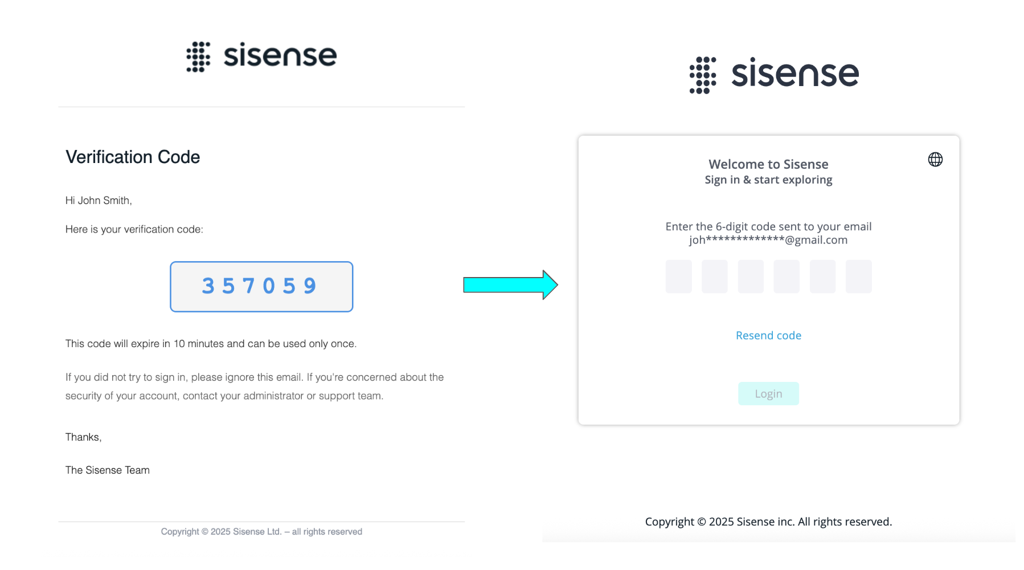
For more information, see Email-Based Two-Factor Authentication (2FA) for Sisense Native Users.
What's Improved
Add-Ons
-
Previously, the metadata add-on that displays column and table names in a language different from the database was not compatible with the AE (Analytical Engine), causing the system to default to the OT (Original Translator). This has now been fixed and the AE fully supports the metadata add-on.
Build To Destination (B2D)
-
Build to Destination connections are now fully isolated from the regular data source connections managed via Connection Management. From now on, B2D connections can only be created or managed using B2D API endpoints.
Compose SDK Mode
-
Calendar heatmap and Tabber widgets are now compatible with and supported in Compose SDK mode.
-
The Compose SDK Mode feature is now enabled by default.
Connectors
-
Previously, the Snowflake default authentication method was based on a PEM key which was stored unencrypted in the server filesystem. To enhance security Sisense now allows and defaults to authentication based on “private key content” which is encrypted and inaccessible to internal users once its saved.
-
A new option was added for the Snowflake connector to paste the content of the private key instead of uploading the file into the server.
-
The Databricks driver has been updated to version 3.0.1.
-
The Singlestore-jdbc (MemSQL) driver has been upgraded to version 1.2.8.
Infra
-
Sisense now supports Red Hat Enterprise Linux (RHEL) 10.
Note: If you are running Red Hat 10 and are offline, you must install
kernel-modules-extrabefore running the Sisense installation:sudo dnf install kernel-modules-extra-$(uname -r) -y
Sisense Intelligence
-
Sisense now supports GPT-4.1.
-
There is a new API endpoint for testing LLM connectivity by model ID:
-
Previous endpoint:
POST v2/ai/llm/test. The contract was changed (see the REST API description); this method is being deprecated and will be removed in a future release. It is recommended that you migrate to the new method (GET - see below). -
New endpoint:
GET v2/ai/llm/{modelId}/test. This is a new public API method to check BYOK configuration by ID (you can get the list of added configurations viaGET v2/ai/llm/models).
-
-
If you are using Narrative or Managed LLM features, you must whitelist the public Sisense IP address
52.210.201.22/32in your firewall or network security configurations.
Sisense Version Naming and Schedule
Sisense version names and the release frequency is now as follows:
-
Major releases > released quarterly
-
Service packs > released monthly
-
Patches > released as needed on a case by case basis - e.g., fix to the released version, adjustment required by external changes, etc.
The letter “L” will no longer precede the version number.
The format is now: YEAR.QUARTER.SERVICE_PACK-PATCH
Examples:
-
2026.1.0 > first major release of 2026
-
2026.2.1 > first service pack for the second major release of 2026
-
2026.1.0-a > first patch to the first major release of 2026
What's Fixed
Add-ons
-
Jump to Dashboard (JTD):
-
Previously, when using Jump to Destination (JTD) in Shared Mode, the target dashboard filters did not refresh based on the selected widget. This has now been fixed and JTD works as expected in Shared Mode.
-
Previously, filter relationships were not fully supported by Jump to Dashboard - some filters were not passed as expected. This has now been fixed and the filter relationships are transferred to the target dashboard, with all filters aligned. Note that if
mergeTargetDashboardFiltersis true andfilterRelationsexists, all filters passed to the target dashboard will be converted to single-level (non-cascading) filters. -
Previously, using primary filters in conjunction with JTD sometimes either caused console errors, allowed selection of excluded items, or caused filters to appear as both primary and regular filters. The filter intersection logic between source and target dashboards has been fixed so that primary and secondary filters now retain their correct roles and values when JTD is used.
-
Previously, when using the Jump To Dashboard add-on with Dashboard Co-Authoring, filters were not correctly applied, displaying results based on default or outdated filters. This has been fixed and filters are accurately transferred and applied in shared enviornments.
-
-
Previously, in some instances, the add-ons pod entered a CrashLoopBackOff state following an upgrade to an early build of version 2026.1.0, impacting add-on functionality and customer environments. This has now been fixed and functions correctly.
Analytical Engine
-
Previously, in some cases, filtering a dashboard or widget (for example orders totaling over 500) did not display filtered or sorted data correctly in the Analytical Engine. As a result, the dashboard and widgets did not display the correct data. This has now been fixed and filters in the AE operate as expected.
Assistant
-
Previously, when clicking Add to Dashboard from the assistant, the widget was not always added to the dashboard. This has now been fixed and works as expected.
Authentication
-
Session Inactivity configuration is now applied to all roles. Previously, changing the configuration for admin roles was not applied and the previous one was used.
Compose SDK Mode
-
An issue was fixed with Sisense Intelligence Forecast that rendered the forecast incorrectly in CSDK and CSDK mode.
Connectors
-
Previously, under certain conditions, a race condition occurred in Snowflake during schema SWAP and DROP operations. This has been fixed and these commands are strictly serialized, ensuring data integrity and preventing accidental schema deletion during high-velocity deployments.
Data Models
-
Previously, when CSV files were uploaded to subfolders within the data directory via File Management, they were inaccessible when using Server Access, causing schema refreshes and ElastiCube builds to fail. This has been fixed and users can now successfully import and preview CSV files located in subfolders through the Server Access connection.
Git
-
Committing large data models to Git now works as expected, as the limit was increased. Previously, attempts to commit very large assets (such as data models with hundreds of tables) would fail and return “PayloadTooLargeError,” blocking Git integration for big projects.
Narrative
-
Previously, self-hosted users could change the narrative provider via API to a provider that is not available for them. This has now been fixed and unavailable providers cannot be designated.
Outer Joins
-
Previously, outer joins in legacy models were being sent as-is in compatibility mode, causing inconsistencies. This has been fixed and when using compatibility mode all joins are automatically converted to inner joins, while preserving the original join types which are restored when switching back to the Analytical Engine (AE).
Reports
-
Previously, when using the “Send me a report now“ option in Report Manager, the system did not add the date and time to the email header. This has been fixed and the email’s header now includes the date and time when the report was generated.
-
Previously, after upgrading Sisense from L2023.6 to L2025.1 (Report Manager 1.11.37), CSV exports were returned in UTF-8 encoding with BOM. This has been fixed and CSV files are now exported in plain UTF-8 without BOM.
-
Previously, scheduled or manually-triggered reports occasionally failed with a "Cannot read properties of undefined (reading 'forEach')" error when the "apply custom filters" option was enabled but no specific filters were defined. This has been fixed and the system handles empty custom filter configurations correctly.
Reporting in WAT Flow
-
Changed filters are now reflected in the exported PDF report of the dashboard accessed in the Web Access Token flow. Previously, filters were not applied, creating a discrepancy between the data in the dashboard and the exported PDF file.
Tenants
-
Forgot password emails for tenants now work properly, even if SSO was enabled and later disabled. Previously, if SSO had been enabled for a tenant, users did not receive forgotten password emails, and attempts to reset passwords resulted in errors and no email was sent.
Usage Analytics
-
Previously, Usage Analytics sometimes failed with an error ("Can't Restore Usage Analytics Dashboards") when Co-Authoring was enabled. This was caused by an incorrect user ID format being returned during the dashboard restoration process. This has now been fixed Usage Analytics can be activated successfully in environments with Co-Authoring enabled.
User Parameters
-
Validation for null values has been added when creating user parameters via API - the request is not executed and an error is returned. Previously, the parameters were created and caused issues with editing such parameters in the UI.
User Roles
-
It is now possible to change the role of admin created in the tenant. Previously, this option was blocked with the only remaining option being to delete and re-create the user with the correct role.
-
Previously, in rare circumstances (such as cache expiration during API authentication), the SysAdmin’s role could be reset to a Viewer role, disrupting automation and scheduled tasks. This has now been fixed such that SysAdmin user roles now remain stable and are no longer unexpectedly downgraded to Viewer.
Web Access Token
-
Accessing dashboards via Web Access Token (WAT) in the environment with the New Navigation Bar enabled now works as expected. Previously, the page failed to load with the error
TypeError: Cannot read properties of null (reading 'getLogo')causing issues in corresponding WAT-based solutions.
Widgets
-
After upgrading from 2025.3 to L2025.4.0.109, when a column's data type was configured as Text, empty cells within the table widget would occasionally display as "(blank)". This has been fixed, and the cells now appear empty.
Limitations
SAML SSO in iFrame on Chrome 142+ (Private IP Deployments)
SAML SSO login flows inside an iFrame on Chrome 142+ with Sisense hosted on a private IP are not supported. Once users are authenticated (for example, by logging in outside the iFrame), viewing dashboards in an iFrame is supported.
Workarounds:
-
Perform SAML SSO in the top-level window (outside the iFrame), then load Sisense in the iFrame using the existing session.
-
Alternatively, expose the SAML callback / Sisense endpoint via a public HTTPS hostname (for example, using a reverse proxy or WAF) that forwards traffic to the internal Sisense instance.
2026.1.1 Release Overview
The content below describes the new features, improvements, and bug fixes included in the February 2026, 2026.1.1 release.
For a list of release dates and Sisense's end of support schedule, see Sisense Version Release and Support Schedule.
For information about the Sisense gradual rollout process, as well as an explanation of how the versions and release notes relate to content added during the rollout, see Sisense Gradual Rollout Process.
What's New
The following table lists the high-level impact (or potential impact, if any) of new features, and how to handle it if upgrading to version 2026.1.1 or newer. Continue reading the Release Notes below the table for a detailed explanation of these features, as well as improvements and fixes.
| Feature | Issues and Actions to Consider |
|---|---|
|
Currently in Beta. |
|
| Outer Joins (Beta) |
Currently in Beta. |
Calculated Dimensions (Beta)
Business Analysts and Dashboard Designers can now create new data grouping and categorization dimensions on-the-fly (e.g., Concat, Left, Right) directly within the widget editor, without requiring backend data modeling changes or ElastiCube rebuilds.
Use the Widget Editor for:
-
Binning & Grouping: assign values to custom groups (e.g., grouping "sku_124" and "sku_124_old" into "sku_124").
-
String Manipulations: Functions to extract parts of text or reshape dates (e.g., LEFT(Region, 3)) to create new axis categories.
Outer Joins (Beta)
Note:
Outer joins are only compatible with the Analytical Engine.
Overview:
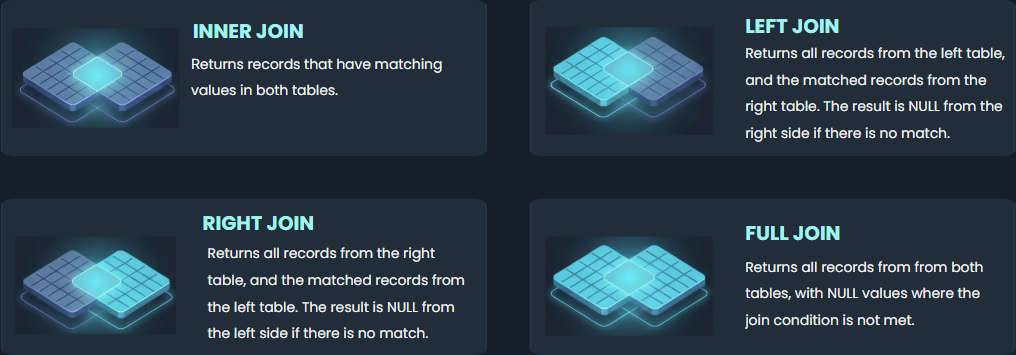
Sisense has added support for left, right, and full outer joins in the data modeling environment (for both ElastiCubes and Live Models), moving beyond the current default of inner joins. This allows dashboards to retain unmatched rows, thereby providing more comprehensive analysis, and easier identification of data integrity issues.
Background:
Inner joins remain the default when creating a join between tables. They only show rows with matching data and are faster to execute. However, inner joins exclude partial matches, and thus, prevent potential analysis of missing data such as “customers who haven’t placed any orders” and “unsold products”. Previously, outer join operations were only available via ETL or derived tables. However, this method was not flexible and time-consuming. It also caused data model complications.
The outer joins feature (left, right, and full joins) provides a more comprehensive overview of data, highlighting not only where queries match but also showing non-matching data. Data modelers can execute joins directly within the user interface, minimizing the need to edit SQL or perform other manual operations. The new feature improves data modeler-side controls, thus establishing a stronger emphasis on data governance, as these decisions are made prior to dashboard creation and data analysis.
How it Works:
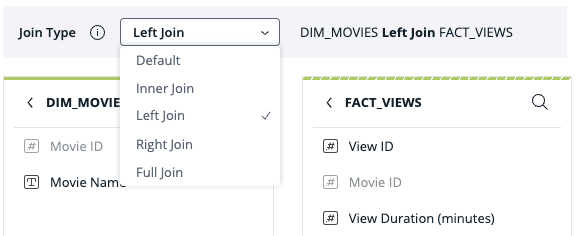
When editing a relationship between tables in a data model, a drop down menu lists all available join types: Default, Inner Join, Left Join, Right Join, or Full Join.
What’s Improved
Analytical Engine
-
LookUp within Custom Columns and Outer Join within Custom Tables are now both supported by the Analytical Engine.
Installation
-
This change only affects customers who are installing Sisense with SSL (or using gateway port 80).
Due to the approaching ingress-nginx end of life, Sisense has migrated from the old ingress-nginx implementation to the new method of Gateway API - the NGINX Gateway Fabric implementation:
This means that for new customers who choose to install Sisense with HTTPS dns name + SSL (or using gateway port 80), the Helm chart of Nginx Gateway Fabric (NGF) will be installed + a Kubernetes
Gatewaywill be created + a KuberneteshttpRoutewill be created in their namespace (instead of the oldingressas in the past).WARNING:
For existing customers with SSL who have the old
ingress-nginximplementation - the next update will delete the ingress-nginx helm chart and will replace it with the new NGF implementation!If you choose to keep the old
ingress-nginximplementation (EOL March 2026), open the file installer/extra_values/installer/installer-values.yaml and setinstall_nginx_gateway_fabric: false. This will skip the deletion ofingress-nginxand will also skip the installation of NGF, and will continue to use the oldingress(and will not createhttpRoute).For instructions to manually install the Sisense Helm Chart with SSL, see Manually Installing Sisense Helm Chart - with SSL.
Outer Joins
-
The Outer Joins feature is now turned on by default for all existing and new users. To disable or re-enable it, navigate to: Admin > Feature Management > Advanced Analytics > Outer Joins Control.
-
Non-default join types are now highlighted in data models:
-
In list view: for tables with a single join relationship, an icon is displayed in the table row. For tables with multiple join relationships, the icons are displayed in the join details popup.
-
In diagram view: visual indications of non-default join types now appear directly on the relationship lines in the data model graph using Venn diagram-style visuals.
-
-
When selecting a join type, the UI now displays a visual representation of an inner join next to the default join option to indicate the type of join.
-
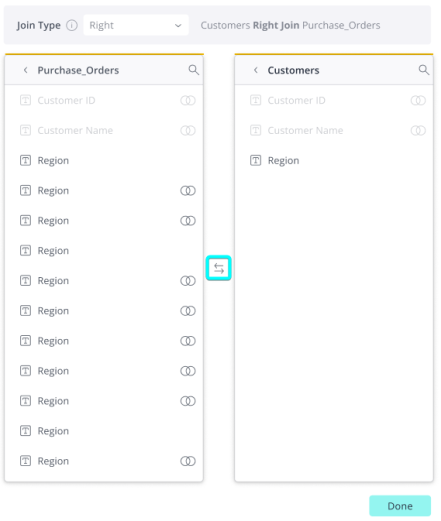
When creating a join between 2 tables, users can switch which table appears on the left and right sides of the join panel by clicking the button (see screenshot below).
Limitation:
-
When using “Compatible mode” the join type cannot be edited and the corresponding dropdown selector is disabled.
Report Manager
-
In multitenant systems, all tenants can now schedule reports using Report Manager.
Sisense Intelligence
-
Sisense Intelligence features now use GPT 4.1.
-
The Assistant and Narrative now fully adapt to your selected system language, and are not exclusively in English. This includes generating Narrative content in the selected language and localizing all Assistant menus and tooltips.
-
The NLQ agent for the Assistant has been improved to provide better accuracy, consistency, and stability.
-
Users can create dashboards and add various widgets to the same dashboard within a chat session in the Assistant.
-
When more than 85% of your token quota is exceeded during a Semantic Enrichment request, a clear warning notification is displayed.
What's Fixed
Analytical Engine (AE)
-
When long column names are used within functions, the AE generates a descriptive alias. If this string exceeds 128 characters, some providers (e.g., MSSQL) reject the query with an error. The row function alias length has now been limited to 128 characters, thereby preventing this error from occurring.
APIs
-
Previously, the REST API 1.0 endpoint
GET /elasticubes/live/{title}/datasecurityincorrectly returned a 200 status code with an empty array when a non-existent live data model was specified. The API now correctly returns a 404 error, aligning with the documented behavior and ensuring proper error handling for API consumers. -
Previously, the REST API 0.9 endpoint
GET /elasticubes/{server}/{elasticube}/datasecurityincorrectly returned a `200 OK` status with an empty array when a non-existent ElastiCube was specified. The API now correctly returns a `400 Bad Request` error in this scenario, aligning with the documented behavior for invalid ElastiCube identifiers.
Dashboard Co-Authoring
-
Previously, sharing a dashboard via the
/api/v1/dashboardsendpoint did not correctly grant access to users when Co-Authoring was enabled. The added users were unable to view or access the dashboard. This has been fixed and dashboard sharing via the API works consistently regardless of whether Co-Authoring is active. -
Previously, when Co-Authoring was enabled, adding a co-owner to a dashboard via the
PATCH /dashboards/{id}API was not reflected in the user interface. This has been fixed and co-owners added via API a ppear in the user interface.
Dashboard Color Palette
-
Previously, when a dashboard color palette was defined in a custom theme, it was not applied to widgets when embedding dashboards via the EmbedSDK. This has been fixed and the theme's color palette is applied correctly.
Embed SDK
-
Previously, in Embed SDK, the `widgetBeforeQuery` event was sometimes triggered multiple times during dashboard loading, leading to unnecessary executions for add-ons relying on this event. To ensure efficient handling, Sisense now provides a unique `reason` identifier in the event arguments (`args.reason`). Developers can now filter their logic to execute only for relevant reasons, such as actual data query executions, while ignoring internal recalculations or layout updates.
Export to PNG
-
Previously, dashboard images exported to a PNG did not retaain the custom "look and feel" settings. This has been fixed and the exported PNG accurately reflects the theme configurations set in the Admin panel, ensuring the title and other dashboard elements remain visible on custom backgrounds.
Forecasting
-
Previously, forecasting data was missing from CSV exports when the exportmodifications add-on was enabled. Users exporting widgets with forecasting enabled would only see historical data in the exported CSV file. The export logic has been updated to correctly include and inject forecast values into the CSV dataset when the add-on is active.
Pulse Alerts
-
Previously, when one user deactivated a Pulse notification, all other users stopped receiving the notification as well. This has now been fixed and Pulse email notifications are only deactivated for the specific user who executed the request.
Report Manager
-
Previously, CSV exports in Report Manager failed to respect "OR" logic defined in the Filter Relationship editor and defaulted to "AND" logic for all filters, resulting in incorrect data filtering and fewer results than expected. The CSV export logic has been updated to correctly parse and apply filter relationship configurations, ensuring consistency across all export formats and the dashboard view.
-
Previously, Report Manager reports would fail with a "401 Unauthorized" error after changes were made to security settings in the admin UI. This occurred because the Report Manager did not actively refresh its authentication tokens when security settings were updated. This has been fixed and Report Manager correctly refreshes its tokens whenever security settings are modified.
-
Previously when configuring reports for a specified period of time, Report Manager continued to deliver reports for one additional day beyond the specified end date. This has been fixed and Report Manager adheres to the configured schedule.
-
Previously, in some cases, when dashboard and widget filters were set to different date-level granularities, the UI reflected both filters but reports generated by Report Manager ignored both filters. This has now been fixed and Report Manager adheres to both filters.
Sisense Intelligence
-
Previously, a large amount of tokens was sometimes consumed when calling the available fields tool. This has now been fixed, and fewer tokens are used.
-
For on-prem systems only - previously, in certain circumstances, the Sisense Intelligence admin page sometimes hung. This has been fixed and the page now opens as expected.
-
Previously, sometimes scrolling via the scroll bar in the Assistant chat did not work. This has now been fixed and you can scroll as expected, using either the mouse or the scroll bar.
-
Previously, in the assistant, users were unable to scroll horizontally or vertically within the chat window when viewing large tables. This fix ensures that all columns and rows in generated tables are accessible via scrolling directly within the assistant interface.
-
Previously, the assistant loaded the original data source instead of the one configured via the Dynamic ElastiCube add-on for users with the Viewer role. This fix ensures that the assistant correctly recognizes and uses the overridden data source settings for all users, providing consistent data insights across different user roles.
SSO
-
SSO enablement and configuration is now saved for tenants as expected. Previously, configuration changes were not saved.
Usage Analytics
-
Previously, the Usage Analytics model was incorrectly created as a B2D model instead of an ElastiCube when the "Build Destination" setting was enabled. This caused build failures for the Usage Analytics model. The model is now correctly created as an ElastiCube, ensuring successful builds and accurate usage tracking.
Widgets
-
Previously, when a “Break by” field in a line chart contained null or empty value, the chart rendered completely empty and affected relevant dashboards. This has now been fixed and line charts no longer render empty if a “Break by” field contains a null or empty value.
-
Previously, widgets sometimes failed with an "Internal Analytical Engine Error" when a dashboard filter was applied together with a formula measure containing a date ranking filter (e.g. top 2 months). This has been fixed and widgets behave as expected when dashboard and date filters are applied
-
Previously, when using a stacked 100 bar chart, the total value labels were displayed outside the chart area. This has been fixed and total value labels correctly appear inside the chart area as expected.
2026.1.2 Release Overview
The content below describes the new features, improvements, and bug fixes included in the March 2026, 2026.1.2 release.
For a list of release dates and Sisense's end of support schedule, see Sisense Version Release and Support Schedule.
For information about the Sisense gradual rollout process, as well as an explanation of how the versions and release notes relate to content added during the rollout, see Sisense Gradual Rollout Process.
What's New
The following table lists the high-level impact (or potential impact, if any) of new features, and how to handle it if upgrading to version 2026.1.2 or newer. Continue reading the Release Notes below the table for a detailed explanation of these features, as well as improvements and fixes.
| Feature | Issues and Actions to Consider |
|---|---|
| Embedding Dashboards via Compose SDK |
N/A |
Embedding Dashboards via Compose SDK
The Embed Code feature now supports Compose SDK code snippets for dashboards. Users can now generate code to embed a dashboard using Compose SDK. This complements the previously available iFrame option, provides easier access to the modern approach for embedding dashboards, and also helps facilitate dialog between Sisense users and application developers. The Embed Code feature also provides the ability to reference a Sisense dashboard by ID, choose a framework (React, Angular, or VueJS), and configure whether users have access to a filter panel and a dashboard toolbar. For more information about Compose SDK, see the Quickstart guide for using Compose SDK.
What's Improved
Analytical Engine
-
The Analytical Engine is now enabled by default for MySQL and Oracle.
APIs
-
Previously, calling the share dashboard API also published the dashboard. The API has been modified so that dashboards can now be shared without publishing and published without modifying existing permissions.
Connectors
-
Official support has been added for a FIPS-compliant Snowflake driver, ensuring encrypted data transmission adheres to Federal Information Processing Standards (FIPS 140-2).
-
Separate Connector: To prevent performance degradation risks associated with FIPS-validated encryption, the FIPS-compliant connector is offered via a separate connector. It does not impact the existing or future standard Snowflake connections.
Note: Because FIPS-compliant drivers prioritize rigorous cryptographic validation, this driver may result in higher CPU overhead compared to the standard driver. We recommend only using this driver if FIPS compliance is mandatory for your organization.
-
Dashboards
-
A new query parameter action is now available for the dashboard sharing API. It determines which dashboard operation to perform:
-
Share: update dashboard shares without republishing a dashboard (new users will get the last published version).
Note: When a dashboard is shared for the first time, it is also published.
-
Publish: publish latest dashboard changes without updating shares (if the updated shares are passed in the body, they will be ignored).
-
None: execute both share updates and publish.
-
Dashboard Co-Authoring
-
The shared dashboard lock can now be configured with a timeout limit between 1 hour and 1 year.
Report Manager
-
The Report Manager APIs have been certified and standardized to meet REST API standards and facilitate custom UI development. Hidden but relevant endpoints are now exposed and success/error codes and validation methods are now consistent and user-friendly.
-
The
GET /api/v1/report_manager/reportsendpoint now requires thepagequery parameter. Requests that omit it will return a 422 error. This change was introduced as part of the Report Manager REST API certification mentioned above to align the endpoint with modern REST API standards.
-
-
The feature toggle for Report Manager is now located in: Admin > Feature Management > Management.
Sisense Intelligence
-
Users can reference Shared Formulas by name in NLQ queries, ensuring that AI-driven insights are always aligned with Sisense’s single source of truth. This means that you can now ask the assistant questions that require data from shared formulas associated with the current data source and receive results including, and based on, that data.
Note:
The following limitations currently exist, and will be addressed shortly in an upcoming version:
-
This functionality is not yet implemented for dashboard-level formulas.
-
There are certain instances in which the assistant may not retrieve the awareness of the shared formulas from the NLQ.
-
What's Fixed
Add-ons
-
Accordion - Previously, if a dashboard contained an ampersand (&) in its name, Accordion could not open the dashboard when referenced by name. This has been fixed and Accordion can successfully open a target dashboard containing an ampersand in its name.
-
Jump to Dashboard -
-
Previously, when using JTD from a widget with a break-by and specific filter relationship settings, the JTD action failed. This has been fixed and the target dashboard now opens as expected.
-
Previously, when applying filter changes to a JTD drill dashboard, Accordion dashboards did not reflect those changes when the dashboard was accessed using a Web Access Token (WAT). This has been fixed and the Accordion dashboards reflect the changes to the dashboard filters.
-
Previously, users with more than 1,000 dashboards could not see or select all available dashboards in the JTD settings. This occurred because the dashboard list was limited to the first 1,000 records, often resulting in an empty or incomplete list if the required drill-to dashboards fell outside that range. JTD now correctly retrieves the full list of dashboards.
-
-
Tabber - Previously, tab labels and checkboxes were difficult to see on dark backgrounds due to hard-coded colors. This has been fixed and Tabber now adjusts the appearance of UI elements based on the dashboard's theme.
Build
-
After upgrading to version 2026.1.1, ElastiCube builds could fail with a "3000 | Invalid cube schema" error when the Analytical Engine was configured as a separated service. This was caused by a change in HTTP request body size limits during a Java infrastructure upgrade. The issue is resolved by explicitly configuring the request size limit for the Analytical Engine service. As a workaround in 2026.1.1, disabling the
useAnalyticalEngineAsSeparatedServiceconfiguration allows builds to succeed. This has been fixed in 2026.1.2.
Calculated Dimensions
-
Previously, calculated dimensions that started and ended with a constant string (e.g., CONCAT('n',[Name], 'L')) sometimes returned an error when applying a filter on it. This has now been fixed, and applying a filter on this type of calculated dimension works as expected.
Connection Manager
-
Previously, in some cases, when the JDBC connector was configured for live connections, the connection could not be added to live models when the Connection Manager was enabled. This has been fixed and works as expected.
Custom Code
-
Previously, default Nginx burst settings in NGF could block legitimate requests, causing the Custom Code Notebooks page and large dashboards to fail loading (HTTP 503 errors). This impacted both the main UI and ComposeSDK. The issue was fixed by removing these limits from the default configuration.
Dashboard Co-Authoring
-
Previously, when the main dashboard owner of a co-owned dashboard was deactivated, other co-owners were unable to access and edit the dashboard. This has now been fixed and dashboards can be accessed by co-owners even if the main owner has been deactivated.
-
Previously, concurrent dashboard ownership change requests via the change_owner API sometimes resulted in a dashboard having multiple owners simultaneously. This race condition, often triggered by automation retries or parallel jobs, led to an inconsistent state that caused subsequent automation failures. This has been fixed by introducing a per-dashboard locking mechanism, ensuring proper ownership transition and that overlapping requests are rejected until the current transition is complete.
Data Models
-
Previously, removing the data model owner made the model inaccessible. This has now been fixed such that the owner is changed to the sysadmin user and the model remains accessible.
-
Previously, if a user saved the share modal before all existing permissions fully loaded, existing shares were removed. The Save button is now disabled and a loading indicator is displayed until all permission data is fully loaded.
-
Previously, in some cases, column descriptions in a data model (ElastiCube or Live) were lost after performing a "Refresh Schema" on the table. This has been fixed and column descriptions are now correctly preserved during schema refreshes.
ElastiCubes
-
Previously, ElastiCubes would terminate prematurely after being started via the UI or a dashboard, even when the "Stop When Idle" setting was enabled with a specific inactivity period. This has been fixed and the inactivity timer adheres to the configured 'IdleMinutes' parameter.
Export to Excel
-
Previously, when exporting a large dataset (> 1000 rows) as an Excel spreadsheet, an extra subtotal row was inserted every 1000 rows. This has been fixed and subtotal rows are only generated for the actual subsets, matching the pivot data displayed in the dashboard.
Filters
-
Previously when opening the legacy date filter, the filter menu was blank and users could not choose a different time-based filter. This has now been fixed and the menu appears as expected.
Functions
-
Previously, using the `ALL` function in a formula with the Analytical Engine enabled could result in an "Internal Analytical Engine Error" (`java.lang.ArrayIndexOutOfBoundsException`). This occurred specifically when the formula grouped by a field from a table not connected to another table, causing a mismatch in the expected column count. This fix refines the shift position logic to ensure queries are processed successfully and return consistent results.
Git Integration
-
Previously, under specific circumstances, when pulling changes from the remote repository there could be a validation error along with uncommitted changes that appeared by themselves. This has now been fixed, and pulling from Git no longer returns that error, nor unexpected uncommitted changes.
Outer Joins
-
Previously, in some rare configuration cases, after disabling the outer joins feature, the existing joins remained in the SQL query and continued to affect query results. This has now been fixed and outer joins work as expected.
Query Plan Analyzer
-
Previously, users were not notified if the Query Plan Analyzer add-on stopped working. This has been fixed and the Query Plan Analyzer now notifies users if there is an error.
Report Manager
-
Previously, attempting to create a scheduled report with a name that was already in use returned an ambiguous error message. This has been fixed and the system displays a clear message indicating that the report name is already taken.
Reports
-
Previously, dashboard images contained in scheduled PDF reports were not scaled to the PDF layout settings, occasionally resulting in dashboard content being cut off. This has been fixed and the PDF exports now use the correct paper size and orientation.
-
Previously, the "Data As Of" (Last Build Time) timestamp was sometimes missing from PDF attachments in scheduled email reports, even when the setting was enabled. This has been fixed and the timestamp is now included in PDF files attached to scheduled email reports.
Simply Ask (NLQ)
-
Previously, the `ai-integration` service (Simply Ask) could crash during initialization if it encountered an error while compiling the model. This fix ensures that while a specific Simply Ask specification might fail to build, the system remains stable and other AI-related flows continue to function as expected.
Single Sign-On (SSO)
-
Previously, users with the Admin role were unable to complete the SSO logout flow when using OIDC. This occurred because the
idTokenHintwas not being saved for users with administrative roles, preventing the identity provider from correctly processing the logout request. The fix ensures that theidTokenHintis correctly updated and stored for all users, regardless of their role.
White Labeling
-
Previously, an issue existed where, upon removing the Analytics Homepage URL in White Labeling settings, the URL would reappear after the settings were saved and the page was refreshed. This issue has now been resolved, and users can successfully delete the analytics homepage URL.
Widgets
-
Previously, certain widgets failed to load and displayed an "Error Format result" message. This occurred because the Analytical Engine incorrectly omitted requested dimensions from the final SQL query, leading to a mismatch between the expected and actual number of columns in the result set. This fix ensures that all dimensions required by the widget are included in the generated SQL.
-
Area Map - Previously, when clicking on certain countries in the Area Map widget, the dashboard did not filter by those countries. This has been fixed and clicking on any country filters the dashboard for the chosen country.
-
Bar/Stacked 100 Chart - Previously, when zooming in or scrolling through a bar/stacked 100 chart, some of the labels overlapped, making the chart hard to read. This has been fixed so that labels are correctly spaced or skipped to retain legibility.
-
BloX - Previously, BloX widgets appeared blank or displayed a grey area at the top when a filter did not return any matching results. This occurred even if the filtered field was not used within the BloX widget itself. The fix ensures that the "No results" overlay is displayed correctly and that the widget renders consistently when changes are applied in the widget editor.