2026.3 Release Notes
Last updated: October 1, 2026
For a list of release dates and Sisense's end of support schedule, see Sisense Version Release and Support Schedule.
For information about the Sisense gradual rollout process, as well as an explanation of how the versions and release notes relate to content added during the rollout, see Sisense Gradual Rollout Process.
Versions Documented in these Release Notes
Regarding Salesforce Security Updates to the "Use Any API Client" Permission:
-
For customers using Sisense connections to Salesforce, it is important to note a significant Salesforce change and steps that you may have to take for continued correct functionality. See Salesforce “Use Any API Client” Permission Changes: Sisense Impact & Migration Guide.
Regarding Upgrading:
-
Version L2025.4 Service Pack 1 contains an important fix. Therefore, it is strongly recommended to upgrade to SP1 or newer.
-
Customers currently running Sisense versions older than L2025.2.0.249 cannot directly upgrade to versions L2025.3 or newer. You must first upgrade your Sisense installation to version L2025.2.0.510. Only after completing this intermediate upgrade can you proceed to version L2025.3 or newer. This important change is due to Sisense upgrading to MongoDB 8 starting from Sisense version L2025.3.
Note: MongoDB 8 is not compatible with Linux Kernel 6.19 through 7.0.13. Therefore, do not use those kernel versions.
-
To download the latest Sisense version, or to upgrade to an older version, see that version’s Release Notes and contact your Sisense Customer Success Manager for the version package.
-
To upgrade to this version of Sisense:
-
Read the Release Notes of all the versions following your current version, up to and including the version to which you are upgrading.
-
Run a system backup before upgrading. See Backing up and Restoring Sisense.
-
Follow the upgrade procedure in Upgrading Sisense.
-
Privacy and Security Information
This release contains several security related updates. We highly recommend upgrading to this latest release to take advantage of any security-related updates and benefit from the Sisense support and warranty. In addition, Sisense strongly recommends regularly testing and auditing your environment after upgrading, and periodically during your subscription term, to ensure all privacy and security settings remain in place.
Customers are responsible for controlling and monitoring your environments and are therefore in the best position to ensure the correct security settings are in place for how you use Sisense products.
Due to the complexity of Sisense products, we strongly suggest that all customers ensure that you understand how all of the privacy and security settings within Sisense work.
If you use Sisense to store/process sensitive data, it is your responsibility to review and test your implementation to ensure you are not inadvertently sharing data with unauthorized third parties. For more information on data security rules, see Data Access Security.
BREAKING CHANGES - WARNING!
The following is a cumulative list of potentially breaking changes from approximately the past 12 months, and may also include warnings about upcoming changes:
The REST API Swagger/OpenAPI version has been updated, introducing stricter request validation. Requests that do not conform to the documented API specification — for example, those including unrecognized parameters or missing required ones — might be rejected with 422 errors.
Starting with Sisense version 2026.4.0, self-hosted (on-prem) Sisense deployments will use the Sisense-hosted vector database, running on the local Sisense MongoDB instance, for the assistant and Search, replacing customer-managed "Bring Your Own Vector Database" (BYO VDB) configurations. As part of the upgrade to this version, all self-hosted customers currently using a BYO VDB will be migrated to the Sisense-hosted vector database. New self-hosted deployments will only support the in-box vector database; BYO VDB will no longer be available as a configuration option. Managed cloud (SaaS) deployments are unaffected and continue to use the existing hosted vector database (Atlas).
Customers who need to keep using their own vector database should contact their Sisense Customer Success representative before upgrading.
Shared formulas no longer persist or propagate across differing data sources. Workflows relying on cross-datasource formula leakage will need to define formulas explicitly per data source.
Customers using the GenericJDBC connector with a custom dialect Java file will need to recompile and potentially update your code.
All custom dialect files must be recompiled after the upgrade because the underlying Calcite JAR has changed. Even if no code changes are needed, the old compiled .class file may not work correctly with the new Calcite runtime.
To recompile: re-upload the dialect .java source file through the connector management CLI. The system will compile it against the new Calcite JARs automatically.
Breaking API Changes
The following changes may require code modifications in custom dialect files.
1. Operator Comparison Pattern
This was observed for LOG10 but may affect other operators compared using identity (==). The safe approach is to use name-based comparison.
Before:
if (call.getOperator() == SqlStdOperatorTable.LOG10) { ... }After:
if (call.getOperator().getName().equalsIgnoreCase("LOG10")) { ... }Reason: Calcite changed SqlStdOperatorTable from a reflective scan to an immutable multi-map (CALCITE-6024), which altered operator object resolution order. Identity comparison (==) is no longer reliable for matching operators.
2. SqlSelect Constructor - New qualify Parameter
The SqlSelect constructor gained a new qualify parameter (for the SQL QUALIFY clause). The old constructor without qualify still works but is deprecated.
Before (still compiles, but deprecated):
new SqlSelect(pos, null, selectList, from, where, groupBy, having,
    windowDecls, orderBy, offset, fetch, hints);
// 12 parameters
After (recommended):
new SqlSelect(pos, null, selectList, from, where, groupBy, having,
    windowDecls, null, orderBy, offset, fetch, hints);
//             ^^^^ new 'qualify' parameter (null = not used)
// 13 parameters
3. rewriteSingleValueExpr() Signature Change
If the dialect overrides rewriteSingleValueExpr(), the method signature has changed.
Before:
@Override
public SqlNode rewriteSingleValueExpr(SqlNode aggCall) { ... }
After:
@Override
public SqlNode rewriteSingleValueExpr(SqlNode aggCall, RelDataType relDataType) { ... }
Add import: import org.apache.calcite.rel.type.RelDataType;
4. SqlExtractFunction Constructor
The default (no-arg) constructor was removed.
Before:
SqlExtractFunction extractCall = new SqlExtractFunction();After:
SqlExtractFunction extractCall = new SqlExtractFunction("EXTRACT");5. SqlSampleSpec API Change
If the dialect handles TABLESAMPLE, the getter method was replaced with direct field access.
Before:
Float pct = ((SqlSampleSpec.SqlTableSampleSpec) spec).getSamplePercentage();After:
Float pct = ((SqlSampleSpec.SqlTableSampleSpec) spec).sampleRate.floatValue();6. CTE (WITH clause) Body Framing
If the dialect customizes WITH clause unparsing, the CTE body must now be wrapped in a WITH_BODY frame.
Before:
with.body.unparse(writer, 0, 0);After:
SqlWriter.Frame bodyFrame = writer.startList(SqlWriter.FrameTypeEnum.WITH_BODY);
with.body.unparse(writer, 0, 0);
writer.endList(bodyFrame);
Without the WITH_BODY frame, the CTE body gets extra parentheses, producing invalid SQL.
Security
The move to Apache Calcite 1.36.0 addresses all known security vulnerabilities, including CVE-2022-39135 (CRITICAL, CVSS 9.8 - XML External Entity injection). Calcite 1.36.0 has zero known CVEs.
The Report Manager URL has now changed from /reportManager/main.html#/reports to /app/report-manager#/reports. This is necessary only for when embedding the Report Manager directly by URL.
2026.3.0 Release Overview
The content below describes the new features, improvements, and bug fixes included in the July 2026, 2026.3.0 release.
What's New
The following table lists the high-level impact (or potential impact, if any) of new features, and how to handle it if upgrading to version 2026.3.0 or newer. Continue reading the Release Notes below the table for a detailed explanation of these features, as well as improvements and fixes.
| Feature | Issues and Actions to Consider |
|---|---|
|
|
|
|
|
|
|
|
Compose SDK Version
Compose SDK version used in this Sisense release: 2.30.0
Impersonate User (Log In As User)
Administrators can now start an authenticated session as another user directly from Admin > User Management to reproduce issues and verify per-user configuration exactly as that user sees it.
Key highlights:
-
One-click access - Select Log in as user from the Users grid to start an impersonation session. A confirmation modal requires a reason before proceeding.
-
Strict role-based authorization - Only System Admins, Admins, and Tenant Admins can initiate impersonation, and only for users with a strictly lower privilege tier. Tenant Admins are restricted to users within their own tenant.
-
Supports all authentication types - Local, Active Directory, and SSO (SAML/OIDC) users are all valid targets.
-
Full audit trail - Every session start, stop, and action performed during impersonation is recorded in the audit log with the real administrator's identity (
impersonatedBy), along with the reason provided. -
Built-in safeguards - Sessions are time-limited (default 30 minutes, max 40), rate-limited per administrator, and capped at 3 concurrent sessions. Password changes, API token creation, and MFA resets are blocked during impersonation.
-
Persistent visual indicator - A banner is displayed throughout the session confirming impersonation is active, with a one-click "Return to admin" option.
-
Admin opt-out - The feature is enabled by default and can be toggled off under Settings > Security > Authentication Settings > "Enable impersonation for Admins".
Sisense Intelligence Search (Beta)
Sisense Intelligence Search lets you find existing widgets across all of your accessible dashboards using natural language. Instead of navigating dashboard by dashboard or recreating visualizations that already exist, you can describe what you are looking for and get a ranked list of relevant widgets. The search is currently powered by a hybrid search — both vector-based semantic search (so results reflect intent rather than exact keyword matches), not an LLM (no credits consumed) and a lexical search. A future version is planned to be powered only by a vector-based semantic search.
What You Can Do
-
Search by intent - type a topic like "revenue" or "financial overview" and get back matching widgets from across dashboards, with widget name, parent dashboard, and data source.
-
Act on results - preview a widget, jump to its source dashboard, or pull selected widgets into a new dashboard (create action gated to Designers per Role-Based Access Control (RBAC) ). A future version is planned to include pulling widgets into existing dashboards as well.
-
Embedded support - available as an iframe-embeddable surface for embedded customers.
What's New in Beta
This feature was first introduced as Preview in release 2026.2.2. The current Beta milestone addresses post-Preview feedback and hardens the experience:
-
Sharper, higher-quality results. Relevance ranking now applies a confidence threshold that hides weak matches rather than padding the list with off-topic results. Exact and strong matches are clearly separated from loosely related "similar" widgets, so you can act on the top of the list instead of sifting through everything.
-
A more polished experience. Search now includes clear empty, no-results, and not-indexed states, along with filtering and query chips to refine what you see. Indexing runs invisibly in the background, so search stays available even while your data is being updated.
-
Smarter permissions for Viewers. Viewers now see only the actions they are allowed to take — search, preview results, use Find similar, and open dashboards they have read-only access to — with no surprise permission errors. Edit and create actions remain unavailable to Viewers, and gating follows per-dashboard share level rather than system role alone.
How it Works
-
Search is powered by a vector database over widget metadata (title, axis labels, metrics, categories, descriptions). No LLM is involved and no credits are consumed.
-
When an Admin enables the feature (in Admin > Sisense Intelligence), a full re-index of all published dashboards is triggered automatically. Re-indexing also occurs when a dashboard is republished. A scheduled index refresh keeps data model changes in sync over time.
-
Results respect data permissions - users only see widgets they are allowed to view.
-
Richer widget metadata (descriptive titles, axis labels) produces better match quality.
Current Limitations
-
Compose SDK hook/component is planned for the future, but is not yet included.
-
Knowledge-graph integration for usage-based ranking, search across dashboards/data sources/tables, and analytics-tab integration are planned for the future, but are not yet included.
What's Improved
APIs
-
The REST API Swagger/OpenAPI version has been updated, introducing stricter request validation. Requests that do not conform to the documented API specification — for example, those including unrecognized parameters or missing required ones — might be rejected with 422 errors.
Compose SDK Mode
-
CSDK Mode now supports Sisense Intelligence Narratives.
Dashboards
-
Several improvements have been made to dashboard semantic search:
-
Unpublished dashboards no longer appear in search results
-
Duplicate entries are removed from search results
-
Overall faster search results
-
New retry mechanism ensures a more complete and up-to-date search index
-
Filters
-
Previously, when the "N/A" value was enabled or disabled in a filter, charts sometimes displayed incorrect results and data was shifted across columns. This has been fixed and "N/A" is correctly positioned on the x-axis and that data remains aligned with its corresponding columns regardless of the filter state.
Infra
-
RKE and Kubernetes are upgraded to version 1.36 (latest).
Report Manager
-
Reporting Groups (Beta) - The Report Manager can now group recipients who would receive identical report output and generate the report once per group, instead of once per recipient, reducing generation time and resource usage for large recipient lists. A separate copy is still delivered to each recipient; only the generation step is shared.
Administrators can enable this optimization via the configuration toggle in the Report Manager Global Options > Reporting Groups Enabled (BETA).
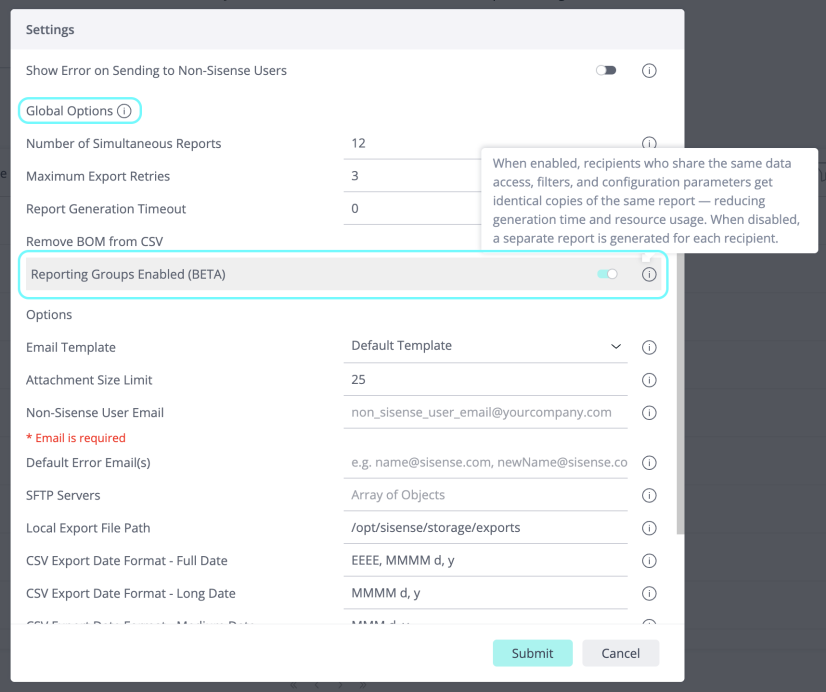
Grouping criteria: Recipients are grouped when they share the same data-security rules, dashboard personalization, data model access, user parameters, and language settings.
Sisense Intelligence
-
The
GET /api/v2/ai/llm/models/providersendpoint has been updated to return a structured catalog of supported LLM providers and their available models, replacing the previous flat array of provider name strings.-
The endpoint now returns a rich JSON response that includes provider name, display name, and a list of supported models (with name and display name) for each provider.
-
The response accurately reflects the officially supported providers, OpenAI and Azure OpenAI, removing previously listed but unsupported entries.
-
Supported models include GPT-4.1, GPT-4o, GPT-4.1 Mini, and GPT-4o Mini.
Example response:
Copy{
"providers": [
{
"provider": "openai",
"name": "OpenAI",
"models": [
{ "model": "gpt-4.1", "name": "GPT-4.1" },
{ "model": "gpt-4o", "name": "GPT-4o" },
{ "model": "gpt-4.1-mini", "name": "GPT-4.1 Mini" },
{ "model": "gpt-4o-mini", "name": "GPT-4o Mini" }
]
},
{
"provider": "azure",
"name": "Azure OpenAI",
"models": [
{ "model": "gpt-4.1", "name": "GPT-4.1" },
{ "model": "gpt-4o", "name": "GPT-4o" },
{ "model": "gpt-4.1-mini", "name": "GPT-4.1 Mini" },
{ "model": "gpt-4o-mini", "name": "GPT-4o Mini" }
]
}
]
} -
-
The LLM providers list on the System Information page is now dynamically fetched via API, ensuring it always reflects the most up-to-date available providers.
-
AI models, indexes, and related assets now stay automatically in sync when schema changes are made. Previously, changes to your data model could lead to inconsistent natural language query (NLQ) results or failed enrichment processes.
With this improvement, the system automatically detects and resolves mismatches caused by schema changes, ensuring that your Sisense Intelligence features, including NLQ, chatbot, and data enrichment, continue to work reliably without manual intervention.
Impact:
-
More accurate and consistent NLQ results
-
Fewer errors when building or updating AI models
-
No more manual troubleshooting of broken enrichment flows after schema changes
-
What's Fixed
Add-ons
-
JTD - Previously, importing a dashboard built on an ElastiCube into an environment with a Live model of the same name caused the dashboard to incorrectly query the Live model instead of reporting a missing ElastiCube. This led to broken UI elements and non-functional "Jump to Dashboard" (JTD) settings. The system now correctly validates the data source type (Live vs. ElastiCube), ensuring that if the required ElastiCube is not found, an error is displayed rather than querying the wrong data source.
Analytical Engine
-
Previously, the "Analytical Engine Settings" option remained visible at the model level even when the global system configuration was set to enforce Analytical Engine only (`AE_ONLY`). This fix ensures that redundant model-level toggles are correctly hidden when the Analytical Engine is globally enforced, providing a consistent user interface across all models.
Build
-
Previously, in Linux multi-node environments, stale database farm files were not automatically cleared from the local storage path (
/opt/sisense/local_storage) following abnormal pod terminations, such as Out-of-Memory (OOM) events. This could lead to disk space exhaustion on application and query nodes, potentially causing subsequent build failures. A proactive cleanup mechanism has been implemented to identify and remove these orphaned directories during pod startup, ensuring disk space is reclaimed before new extractions begin. -
Previously, dashboards displayed an incorrect "Last Successful Build" timestamp even after an ElastiCube build completed successfully. This occurred due to a processing bottleneck in the message queue. The system now retrieves the build date directly from the database to ensure the timestamp accurately reflects the most recent successful build.
Connectors
-
Snowflake - Previously, the Snowflake connector failed to authenticate when the `timezone` parameter was set to a value containing a plus sign (e.g.,
Etc/GMT+1). This occurred because the "+" character was incorrectly decoded as a space in the connection string, resulting in an invalid timezone error. The connector now correctly encodes these parameters, ensuring that all IANA-compliant timezone formats are supported.
Data Sources & Perspectives
-
Previously, when working with a live model, selecting "Change Table" incorrectly opened the "Change Connection" screen instead of the "Edit Table" window. This has been fixed and the "Change Table" action now correctly opens the edit table window with the current table's SQL query pre-loaded, allowing for direct modification.
Exporting Dashboards
-
Previously, exporting a dashboard (as a PDF or an image) or republishing it in Shared View did not reflect the current filter state when "Update on Every Change" was disabled; the system would revert to the last published version of the dashboard. This has been fixed and the user's current filter state is correctly captured and applied during export and republishing actions.
Formulas
-
Previously, using the `ALL()` function in a formula alongside a date break-by would result in a SQL error (e.g., `types double and timestamp are not equal`) when the
AllInMeasuredValueIgnoreFieldInPathsetting was enabled. This fix ensures that the query structure remains valid and contiguous when dimensions are excluded by the `ALL()` function, allowing date-based grouping to function correctly.
Report Manager
-
Previously, in multi-tenant environments, CSV and Excel report generation failed when the ExportModification plugin was active. This has been fixed and reports retain their custom layout and formatting for tenants without delivery failures.
Services
-
Previously, RabbitMQ queues related to the deprecated Acceleration feature (
sisense.acceleration.service.delete_dashboardandsisense.acceleration.service.delete_ecm) were not fully decommissioned. This caused messages to accumulate indefinitely in these queues without active consumers, potentially impacting RabbitMQ performance and triggering unnecessary alerts. These queues have now been removed to ensure proper system cleanup and stability.
Sisense Intelligence
-
Previously, Administrators and System Administrators encountered an error when attempting to open the assistant on dashboards that were not explicitly shared with them. This fix ensures that privileged roles can access the assistant on any dashboard they have permission to view, regardless of the "Share the assistant" toggle setting, maintaining consistency with general platform permissions. Row-Level Security (RLS) remains fully enforced within the assistant to ensure data exposure remains consistent with standard dashboard access.
-
Previously, the "Enable Assistant" toggle was unavailable on dashboards built from data models with names containing a plus (+) character. This was caused by incorrect URL encoding of the data model name, which prevented the system from verifying the assistant's status for that model. This has now been fixed and works as expected.
-
Previously, in Sisense Intelligence Search, users with Viewer-only permissions could access the widget editor by clicking "view widget" in search results. The "view widget" action now correctly enforces Role-Based Access Control (RBAC), providing Viewers with a read-only preview or navigating them to the source dashboard instead of opening the editor.
-
Previously, the assistant would return a "500 Internal Server Error" when processing queries on extremely large data models (e.g., hundreds of tables and thousands of columns). This occurred because the AI model's response exceeded its output limit while identifying relevant columns, resulting in a truncated response that the system could not parse. This fix increases the allowed response size and improves error handling to ensure the assistant remains stable and provides clearer guidance when dealing with very complex schemas.
-
Previously, in on-prem deployments where the `similarity-service` was marked as ready before it could accept traffic, there were connection timeouts (`ETIMEDOUT`) and migration failures in the `ai-integration` service during startup. This has been resolved by adding proper readiness and liveness probes to the Helm charts for the AI-stack components, ensuring services are fully initialized before receiving requests.
-
Previously, in Sisense Intelligence Search, performing a search that returned no matches failed to update the UI, leaving the initial landing page visible. This fix introduces a dedicated "no results" state that provides clear feedback and suggestions when no matching widgets or dashboards are found, ensuring that you can distinguish between a search with zero results and a system that is still loading.
-
The Narrative button in the assistant UI was previously displayed for on-prem (non-managed) deployments, even though the Narrative feature is not supported in those environments. Clicking the button had no effect. The button is now correctly hidden for on-prem deployments.
Widgets
-
Previously, in Compose SDK (CSDK) dashboard mode, when duplicating a widget via the header menu, the widget could not be edited without refreshing the page. This has been fixed and duplicated widgets are synchronized between the React and AngularJS layers, allowing immediate access to the edit toolbar and proper identification of the new widget's server ID.
2026.3.1 Release Overview
The content below describes the new features, improvements, and bug fixes included in the August 2026, 2026.3.1 release.
For a list of release dates and Sisense's end of support schedule, see Sisense Version Release and Support Schedule.
For information about the Sisense gradual rollout process, as well as an explanation of how the versions and release notes relate to content added during the rollout, see Sisense Gradual Rollout Process.
What’s New
The following table lists the high-level impact (or potential impact, if any) of new features, and how to handle it if upgrading to version 2026.3.1 or newer. Continue reading the Release Notes below the table for a detailed explanation of these features, as well as improvements and fixes.
| Feature | Issues and Actions to Consider |
|---|---|
| Compose SDK Version |
|
| Custom AI Context Across the Product (Beta) |
|
| Extended Chart Styles |
|
|
|
|
|
|
|
|
|
|
|
|
Compose SDK Version
Compose SDK version used in this Sisense release: 2.32.0.
Custom AI Context Across the Product (Beta)
Generic AI answers miss the nuances of your data — what "last quarter" means in your fiscal calendar, which joins are correct, or which metrics are canonical. With custom AI context, every AI-generated answer reads like your own team wrote it.
You can now attach custom context, descriptions, and instructions at every level of your analytics stack — data models, tables, columns, dashboards, and widgets — so the assistant answers in your terms, not generic ones.
What's New:
-
Higher Assistant Accuracy: Eliminates schema hallucinations by explicitly defining internal synonyms and calculation rules
-
Granular Control: Enables localized AI tuning across seven asset layers without altering underlying data structures
-
Self Service: Instantly correct common mistakes without waiting for the LLM to improve
Extended Chart Styles
The widget editor's Design panel now covers a significantly broader range of visual styling options, all without writing a single line of code. Dashboard designers and self-service analysts can now achieve polished, on-brand charts directly from the panel, eliminating the need to drop into widget scripts or manually re-apply styles widget by widget. The Design panel is intended to provide no-code customization. However, until now, several everyday styling needs (label formatting, line styles, visual consistency) required a developer and a widget script. This release closes that gap: analysts and dashboard designers can now produce polished, brand-consistent charts independently, without external tools or engineering dependencies.
What's New:
-
Line style controls (Line & Area charts) — A new Line Style section lets you choose stroke type (solid, dashed, dotted, and more) and set a custom line thickness, all via intuitive no-code controls.
-
Rich value & series label formatting — The Value Label section is extended with:
-
Prefix and suffix text
-
Label rotation (including custom angles)
-
Background color and padding
-
Border color, width, and border radius
-
X/Y offset for precise label positioning
-
Value labels: color, size, and style (normal/italic)
-
-
Pie & Funnel label formatting — The same rich label-formatting options are now available for pie and funnel chart types, with consistent behavior across widget types.
-
Legend — Color, size, and style on charts with a legend pane.
Filter Widget (Beta)
Sisense now supports placing interactive filter controls directly on the dashboard as standalone, configurable tiles, removing the dependency on the right-side filter panel.
Dashboard designers can drag filter tiles into any position within the layout as a horizontal bar at the top, in a side column, or inline between content rows, and configure them entirely through the editor without writing any code. Filter tiles work seamlessly in all Sisense embedded deployments (including Compose SDK).
This current phase introduces the list filter type, enabling searchable drop-down controls bound to data dimensions. The filter state persists across page refreshes and respects the dashboard's "Update on every change" setting.
This capability is particularly useful for OEM and embedded analytics customers, where the native filter panel is often hidden or visually incompatible with the host application, by providing a fully integrated, layout-native, filtering experience.
Folder and Asset Organization (Beta)
Sisense now provides hierarchical folder management for dashboards and assets, making it easier to organize, share, and manage your analytics content at scale. Managing dashboard access and ownership previously had to be done one dashboard at a time, which was cumbersome for organizations with many dashboards organized across folders. This update brings folder-level controls for sharing, ownership, and portability, reducing manual effort and empowering teams to collaborate more efficiently without relying on third-party plugins.
What's New:
-
Hierarchical Folder Organization — Create folders and subfolders to organize dashboards and other assets in a structured, intuitive hierarchy.
-
Bulk Folder Sharing — Share access to an entire folder and all published dashboards within it at once, eliminating the need to share each dashboard individually. (Note: Bulk sharing applies exclusively to published dashboards, ensuring your drafts remain private.) Sharing can be scoped to specific users or groups.
-
Multi-User Folder & Dashboard Ownership — Assign ownership of folders and dashboards to multiple users, enabling any authorized team member to create, move, or manage dashboards within shared folders without requiring a specific user to own the folder.
-
Folder Export & Import — Export folders with their complete dashboard contents and restore the full folder structure on import. If a folder already exists in the target environment, you will be prompted to overwrite, consistent with the existing dashboard import experience.
MCP Server: Remote Hosting and OAuth 2.1 (Beta)
The Sisense MCP Server is now available as a remote endpoint secured with OAuth 2.1, letting any MCP-compatible AI agent, such as Claude or Cursor, explore your data and build charts under Sisense governance.
The remote server is available for:
-
Managed cloud deployments: provided by Sisense as a shared service, hosted and updated by Sisense with no installation or maintenance on your side.
-
Self-hosted deployments: provided by Sisense as part of your installation and operated within your own environment.
To connect:
-
Copy the remote MCP endpoint URL for your deployment.
-
Add it as a connection in your MCP client.
-
Sign in with your existing Sisense credentials, including SSO, and approve access.
No identify provider configuration is required.
Agents connect through Sisense rather than directly to your data, so they work against your semantic layer, including your metrics, terms, and relationships, and results reflect your own definitions.
Security and governance:
-
Agents connect over OAuth 2.1 with no shared credentials.
-
Every request runs as the signed-in user, within that user's permissions.
Sankey Chart
Sisense now includes a Sankey chart as a built-in widget, providing analysts and dashboard designers with a native way to visualize how values move, split, and flow between stages or categories, without custom code, plugins, or external tools. Sankey charts are very relevant and useful visualization types for flow narratives. Previously, achieving this in Sisense required custom-coded widgets (BloX / d3-sankey scripts) or exporting data to external tools. This feature keeps you inside the platform for flow-based analysis.
What's New:
-
Sankey widget in the chart picker — Add a Sankey chart from the widget editor just like any other out-of-the-box chart type.
-
Intuitive field mapping — Map source node, target node, and value (link weight) fields directly in the editor, with optional break-by and color-by for nodes and links.
-
Full Design panel support — Customize orientation, node alignment, node width and padding, and link curve, opacity, and minimum width.
-
Interactive behaviors — Tooltips, selection/highlight, cross-filtering, and drill-downs work consistently with other Fusion widgets.
-
Export & embed — Supports PDF, PNG, and Excel export (including CSDK mode), as well as embed snippets and Pulse integration.
Potential use cases include: Budget and cash-flow allocations, user journey and conversion funnels, source-to-target transfers, supply chain flows, patient pathways, attribution models, and more.
What’s Improved
Analytical Engine
-
The Analytical Engine (AE) is now the default dependency generation engine for all Build API workloads. Previously, dependency generation relied on the original translator, which could cause out-of-memory (OOM) errors when processing large dependency graphs. With AE as the default, Build API consumers benefit from improved stability, reduced fallback scenarios, and more scalable dependency evaluation across all customer datasets and dialects.
Assistant
-
The assistant now incorporates designer-authored semantic metadata — including AI Context, tags, descriptions, and display names — when exploring data sources. When a data model designer publishes semantic annotations on tables and columns, the assistant uses this context to produce more accurate answers and queries that reflect the designer's intended usage (e.g., value synonyms, preferred columns). This enrichment is controlled by the
aiContextEnabledfeature flag and degrades gracefully on older environments where the AI fields API is not available.
Calculated Dimensions
-
You can now use the SUBSTRING() function inside Calculated Dimension formulas. Previously, it was available only in Custom Columns and Custom Tables (evaluated once at build time).
Syntax
SUBSTRING(string, index)
SUBSTRING(string, index, length)
Parameters
-
string: The text to extract from. Any field type can be used; non-text values are automatically converted to text.
-
index: The 1-based starting position (position 1 is the first character). Must be a whole number, 1 or greater.
-
length (optional): The number of characters to return. Must be a whole number, 0 or greater. If omitted, the result runs from index to the end of the string.
See the Dashboard Functions Reference for more information, including examples, behavior, and edge cases.
-
-
Dashboard filters now support Calculated Dimensions. Users can now create top-level dashboard filters based on Calculated Dimension expressions that dynamically filter all widgets across the dashboard, including primary filters.
-
Dashboard-Wide Filtering: CD filters automatically resolve the underlying formula and apply it as a
WHERE/HAVINGclause across all linked widgets and primary filters on the dashboard. -
Multi-Data-Type Interface: Supports Number, String, and Date interface controls with live formula syntax validation.
-
Advanced Filter Contexts:
-
Supports toggling CD filters into background/context mode (shaping scope without active UI filtering).
-
Enables multiple independent CD filters on the same dashboard without cross-filter interference.
-
Ensures multi-data-source routing safety by anchoring each CD filter strictly to its originating data source.
-
-
-
Compose SDK now supports Calculated Dimension (CD) filters in dashboards. Previously, Calculated Dimensions were usable only as dimensions in Compose SDK; dashboard filter support was unavailable because Compose SDK does not include a formula editor UI. With this change, Sisense UI-created CD filters function correctly in Compose SDK, CD filters can be created programmatically (pro-code), and cross-filtering operations that produce CD filters are fully supported.
Data Modeling
-
Data designers can now author AI Context, tags, and descriptions for models, tables, and columns directly in the data model UI. These values are saved under the perspective and carried forward through the Publish Semantics, Build, and Publish flows.
Natural Language Query (NLQ)
-
Natural Language Queries (NLQ) now accept and utilize AI Context, tags, and descriptions provided by the data model designer. When available, NLQ ingests AI Context metadata (at the model, table, and column level) along with field tags and descriptions to build a more accurate column-identification schema. This enhancement enables more precise natural language query understanding by leveraging the designer's semantic input. When AI Context is not configured, NLQ continues to function without regression.
Report Manager
-
The Report Manager now delivers significantly faster report execution and improved reliability under high-volume workloads. Key improvements include optimized report generation that eliminates redundant processing steps, smarter queue handling for more consistent delivery, and enhanced stability when running large numbers of reports concurrently. These changes reduce report failures and ensure a smoother experience for organizations with heavy reporting needs.
Sisense Intelligence
-
AWS Bedrock for Bring Your Own LLM - Bring Your Own LLM now supports AWS Bedrock in addition to OpenAI and Azure OpenAI. You can connect Sisense Intelligence to models running in your own AWS account, using your own credentials and region.
Supported Bedrock models are Anthropic Claude Opus 4.6, Claude Sonnet 4.6, and Claude Haiku 4.5. For setup steps and the full list of supported providers and models, see Setting Up Your LLM.
Bring Your Own LLM continues to be available on both Sisense Cloud and self-hosted deployments.
-
The Query Built tool card in the assistant chat now displays a visual chipset breakdown as the default view, along with a separate dashboard filters breakdown. You can toggle to the full JSON representation for advanced inspection.
-
Error handling and feedback in the AI administration interface (Admin > Sisense Intelligence) has been improved. Previously, connection failures for custom Vector Databases (VDB) or LLM providers often resulted in generic error indicators or full-page blocks without specific details.
With this update, the system now provides detailed, actionable inline error messages directly within the provider cards and configuration pages. These messages specify the cause of the connection failure—such as invalid credentials, unreachable hosts, or malformed connection strings—allowing for faster troubleshooting. Additionally, the interface now supports graceful degradation, ensuring that secondary request failures no longer block access to the entire page, keeping other administrative actions available.
-
The ability to author AI Context, tags, and descriptions at the dashboard and widget level has been added. Values are saved under the respective dashboard or widget and persist across reloads.
Snowflake Connection Setup - Improved UI
-
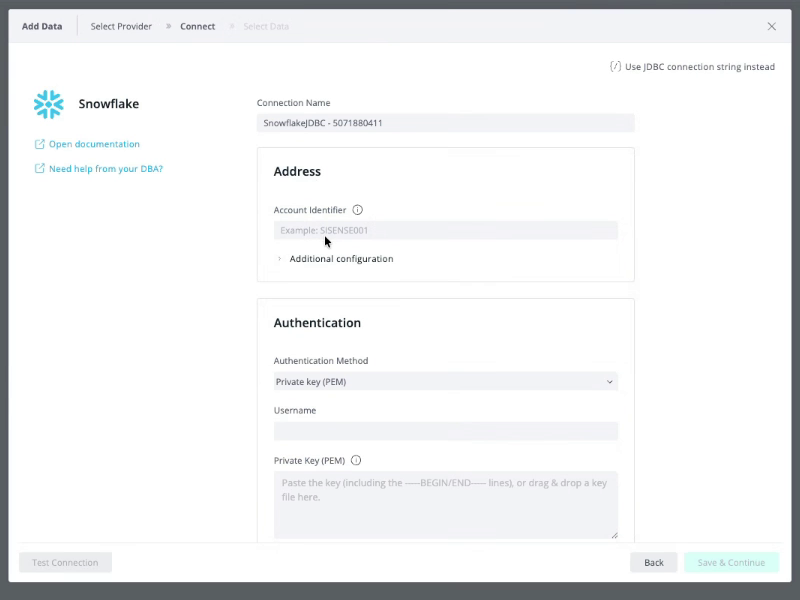
The Snowflake connector setup in the Add Data wizard has been redesigned to make creating a connection faster and less error-prone. Previously, connecting required manually composing a JDBC connection string – a common source of errors. The new guided form shows only the required fields up front, using standard Snowflake terminology:
-
Address – Enter your Snowflake Account Identifier directly – no connection string needed.
-
Authentication – Select an authentication method: Private key (PEM) (default), Private key file path, or Password. Private keys can now be added by dragging and dropping the key file, instead of opening it and copy-pasting its contents.
-
Additional Configuration – Role, Warehouse, Database, and Schema are now optional instead of mandatory, and are collapsed under Additional Configuration together with the Use Dynamic Schema option and connection description. When left empty, your Snowflake defaults (such as the default warehouse) are used.
-
Clearer connection testing – Test Connection now surfaces the specific problem inline, with a copyable error code – for example, incorrect username or password, an invalid role, a warehouse that doesn't exist, or an encrypted private key provided without its passphrase – instead of a generic failure later in the process.
-
DBA request template – If you don't have the required permissions or credentials, click Need help from your DBA? to generate a ready-to-send message for your data administrator that includes the Sisense IP addresses to allowlist, the required access grants, and the RSA public key registration command.
-
Documentation link – Click Open documentation to go directly to the Snowflake connector documentation.
If you prefer to connect using a JDBC connection string, click Use JDBC connection string instead to switch to the JDBC form, which supports an optional private key and key passphrase. You can switch back to the guided form at any time.
Note:
While new Snowflake connections will use this new form, existing connections will continue to use the previous form.
-
What’s Fixed
Add-ons
-
Jump to Dashboard - Previously, folders and dashboards hidden via the Jump To Dashboard (JTD) add-on would become visible to viewers after enabling Dashboard Co-Authoring and adding new shared dashboards to the folder. This fix ensures that "Hide" settings are correctly preserved and can be re-applied to all shared dashboard instances within a folder even when co-authoring is active.
Analytical Engine
-
Previously, some widgets would fail with an "Internal Analytical Engine Error (BE#208517): field not found" when using a Snowflake Live data source. This occurred when a dashboard filter targeted a field from a left-joined table that was not included in the widget's data panels, particularly when that table also served as a bridge to other filtered tables. The Analytical Engine now correctly resolves these fields in the filter scope, ensuring widgets display data as expected without requiring the filtered field to be explicitly added to the widget.
APIs
-
Previously, the
GET /builds/{buildId}API endpoint incorrectly returned a `400 Bad Request` error instead of a `404 Not Found` error when a build ID no longer existed in the system. This fix ensures the API correctly identifies missing resources, allowing for more accurate error handling and alerting in automated workflows. -
Previously, the
GET /api/v2/datamodels/schemaendpoint would time out or respond very slowly on environments with a large number of data models. This was caused by the server processing all schemas before applying pagination limits. The endpoint now correctly applies server-side pagination and includes a caching layer, ensuring significantly faster response times when retrieving schemas in smaller pages.
Assistant
-
Previously, the assistant failed to generate queries for fields with names ending in parenthetical suffixes, such as "Handle time (s)" or "Revenue (USD)". This occurred because the system incorrectly stripped these suffixes, treating them as display metadata rather than part of the actual field name. The assistant now correctly identifies and preserves these suffixes, ensuring accurate query generation for all field types.
-
Previously, the assistant would display a blank chat area without any error message when the underlying LLM was unreachable or misconfigured. The assistant now proactively detects connectivity and configuration issues, surfacing a notification banner with specific guidance based on the user's role. Additionally, Sisense Admins can now view technical details and request IDs directly within the Assistant panel to streamline troubleshooting and support escalation.
Build
-
Previously, ElastiCube build failure could result in the build status being incorrectly displayed as "Running" in the UI, accompanied by a "cubeIsUnreachable" error. This occurred due to a race condition where metadata was not updated if cleanup tasks hung after a failure. This fix ensures that the build status is correctly updated to "Failed" immediately upon a workplan failure, allowing users to trigger new builds without manual intervention.
Compose SDK Mode
-
Previously, in Compose SDK (CSDK) mode, the filter widget remained functional even when the corresponding feature flag was disabled. The filter widget now correctly displays an "unregistered widget" message and disables editing capabilities when the flag is turned off, ensuring consistent behavior with the Sisense Fusion interface.
Connection Management
-
Previously, in Connection Management, the connection dependencies list would break the layout and hide items when a connection had a large number of dependent data models (e.g., 25 or more). The list now includes a maximum height and vertical scrolling, ensuring all dependent data models remain accessible.
Connectors
-
Google Sheets - Previously, building multiple tables from the same Google Spreadsheet could intermittently result in tables containing 0 rows, even when the build reported success. This occurred due to a race condition when parallel builds attempted to access the same temporary file. The connector now safely synchronizes these downloads and uses atomic file operations to ensure data integrity. Additionally, failed downloads will now correctly trigger an error message instead of silently producing an empty table.
Dashboards
-
Previously, ElastiCubes could become stuck in a "STOPPING" state, preventing dashboards from loading and resulting in errors such as "ElastiCube not found on LocalHost." This occurred due to a race condition between the Stop When Idle feature and other lifecycle events, such as post-build pod spin-ups or system upgrades. This fix ensures these operations are properly synchronized and includes a recovery mechanism to automatically clear stuck states, ensuring consistent dashboard availability.
Data
-
Previously, in the Data Apps and ElastiCube manager, searching for data connections failed with a `422 Unprocessable Entity` error. This occurred due to strict API validation introduced in version 2026.3.0-f that did not recognize the search parameter. This has now been fixed and the search functionality has been restored.
Data Models
-
Previously, the Data page would fail to load and display zero data models following bulk concurrent user deletions. This occurred due to a race condition that could leave orphaned share entries in the system. This fix implements guards to prevent these orphaned entries and includes a self-healing mechanism to automatically resolve any existing instances.
-
Previously, AI-driven context and suggestions were not displayed for Live Columns. This fix ensures that the context field is correctly populated and visible within the Live Column interface, providing users with the expected AI insights when working with Live models.
Data Security
-
Previously, importing or duplicating a data model with a large number of Data Security rules (approximately 2,700 or more) resulted in the rules being skipped and the security context left empty. This was caused by payload size limitations and request timeouts during the import process. This fix implements data chunking for security rule imports and increases the default payload limit to 150MB, ensuring that all security configurations are correctly preserved even for complex models.
Explanations
-
Previously, in the Explanations wizard, the "Explore other fields" button was visible to Viewer users who lacked the necessary data source permissions. Clicking the button resulted in a console error and failed to open the field selection modal. The button is now correctly hidden for users without "Can Use" or higher permissions to the underlying data model.
Export to PDF
-
Accordion add-on: Previously, exporting to PDF from a Pivot table drilled within an Accordion widget embedded inside a Blox or Indicator widget exported all data instead of the filtered/drilled data. This has now been fixed and Export to PDF saves filtered data as it is in the Pivot table and even in the downloading preview.
Filters
-
Previously, scrolling within an individual filter using a mouse wheel or touchpad was not possible when the main Filters Panel was already scrolled to the very top or bottom. This fix ensures that scroll events are correctly captured by the specific filter component, allowing for smooth navigation through filter values regardless of the main panel's scroll position.
Formulas
-
Previously, formulas saved as favorites ("starred" formulas) while the Shared Formulas feature was disabled were not automatically converted to shared formulas upon enabling the feature. This fix ensures that all previously starred formulas are correctly migrated, preserved, and displayed within the formula editor as intended.
Functions
-
Previously, in a Pivot widget, using the NOW() function in a formula alongside a multi-pass SUM() measure caused a query error. This occurred because certain complex grand-total calculations incorrectly triggered a fallback to the original translator, which did not support the NOW() function's syntax. This fix ensures these queries are processed correctly by the Analytical Engine.
Git
-
Previously, editing a placeholder connection created during a Git pull would fail with a "duplicate key" error. This occurred because the Connection Management wizard incorrectly used the original source connection's ID instead of the new placeholder's ID when saving changes (such as adding credentials or renaming). This fix ensures that edits are correctly applied to the placeholder connection, allowing users to successfully configure and use connections imported via Git.
License
-
Previously, updating license credentials in the Sisense UI (Admin > License Utilization > Change License) would fail with an "Invalid license credentials" error immediately after a password change in the Sisense Licensing Portal. The licensing service now correctly handles the credential update flow, ensuring that new credentials are authenticated without requiring a service restart.
Multitenancy
-
Previously, in multi-tenant environments, a System Admin accessing a dashboard from a different tenant and selecting Open Data Source could cause data model corruption. This occurred because the system incorrectly synchronized metadata across tenants, potentially changing the model type, altering ownership, or removing the dataset from the UI. This fix ensures proper tenant validation to maintain data model integrity when accessed by administrators across different tenant contexts.
Narrative
-
Previously, AI-generated narratives sometimes incorrectly modified the casing of data values and column names (e.g., converting "USD" to "Usd"). The system now preserves the original casing from the data source, ensuring technical identifiers and standardized codes remain consistent and professional.
-
Previously, the AI-generated narrative incorrectly used sales-oriented terminology (such as "market engagement" or "high-value sales") regardless of the actual data domain. The narrative now correctly incorporates the data model's schema and column context to ensure the generated analysis uses domain-appropriate language, such as "payable volumes" or "vendor invoices" for Accounts Payable data.
Natural Language Query (NLQ)
-
Previously, Natural Language Query (NLQ) requests could fail with a 500 error when using the Bedrock Nova LLM. This occurred because the system incorrectly required a specific field in the model's output that was occasionally omitted by the LLM. This fix ensures the system automatically derives this information, providing a more resilient and stable NLQ experience.
Outer Joins
-
Previously, widgets would fail with a "field not found" error when a dashboard filter was applied to a column in a left-joined table, but that column was not explicitly included in the widget's data panels. This occurred specifically when the tables were joined using a composite key (multiple columns). This fix ensures that filters on non-key columns are correctly resolved and applied through the join path regardless of whether the column is displayed in the widget.
Pivot Tables
-
Previously, in Pivot widgets, enabling a formula using the `Rank` function caused rows with null (empty) values to be removed from the widget entirely. This occurred because the system automatically filtered out rows that could not be ranked. With this fix, rows with null values are no longer dropped; instead, they remain visible in the pivot with a blank rank.
Report Manager
-
Previously, Report Manager PDF exports would fail or hang indefinitely for specific users if their theme reference was invalid or broken. The system now automatically falls back to the default theme in such cases, and the export process will fail quickly with a clear error message if themes or fonts cannot be loaded, rather than waiting for a full timeout.
Shared Dashboards/Folders
-
Previously, in the Share Dashboard and Share Folder modals, removing a user or group from the share list was immediately saved to the server. This behavior was inconsistent with other edits (like adding recipients or changing permissions), which are only saved when the Save button is clicked. With this fix, removing a share is now a local change that can be undone by canceling or closing the modal without saving.
Note: If a user has both a direct share and an inherited share from a folder, removing the direct share will now correctly show the inherited access only after the modal is saved and reopened.
Single Sign On (SSO)
-
Previously, the Single Sign-On (SSO) settings page in the Admin UI appeared blank or failed to display configuration values for Tenant Admins. This occurred because the system incorrectly returned a server error when a Tenant Admin attempted to access license information, causing the page to crash. This fix ensures that the SSO settings page now renders correctly, allowing Tenant Admins to view and manage their SSO configurations as expected.
Sisense for Mobile
-
Previously, users were unable to authenticate to the Sisense Mobile BI app (Android and iOS) following an upgrade to version 2026.3.0-f. The app would remain stuck on the loading screen after entering credentials due to a race condition during the IdP redirect process. This fix ensures that the authentication process completes fully before proceeding and includes a more robust fallback mechanism for loading the dashboard list.
Sisense Intelligence
-
Previously, toggling the dashboard filters after executing a query would retroactively alter an already-built Build Query card. The Build Query card now remains static, reflecting the dashboard-filters toggle state at the moment of execution. An explanatory message now indicates whether dashboard filters were applied at the time of the query execution.
-
Previously, the semantic search index was cleared and left empty if a full reindex was triggered when no published dashboards were available. Additionally, publishing a dashboard that was not shared would fail to index, preventing it from appearing in semantic search results. Both of these issues have now been fixed and work as expected.
-
Previously, the Sisense Intelligence Feature Management admin page would fail to load if the system encountered an error retrieving the list of AI providers. The page is now more resilient; if the provider list cannot be loaded, an inline error message will appear specifically in that section, while all other Feature Management controls remain accessible and interactive.
Widgets
-
Previously, widgets failed to load and displayed "N/A" when a user's timezone was set using a three-letter abbreviation (e.g., MST, EST, HST) instead of a full IANA timezone ID (e.g., America/Phoenix). The connector now correctly recognizes and maps these common abbreviations, ensuring data is extracted successfully regardless of the timezone format provided in the connection string.
-
Previously, Table widgets with pagination enabled would ignore the
widgetQueryLimitsetting if it was set to a value greater than 25. This enabled users to navigate through additional pages and access the entire dataset beyond the configured limit. The limit is now correctly enforced across all pages.
2026.3.2 Release Overview
The content below describes the new features, improvements, and bug fixes included in the September 2026, 2026.3.2 release.
For a list of release dates and Sisense's end of support schedule, see Sisense Version Release and Support Schedule.
For information about the Sisense gradual rollout process, as well as an explanation of how the versions and release notes relate to content added during the rollout, see Sisense Gradual Rollout Process.
What’s New
The following table lists the high-level impact (or potential impact, if any) of new features, and how to handle it if upgrading to version 2026.3.2 or newer. Continue reading the Release Notes below the table for a detailed explanation of these features, as well as improvements and fixes.
| Feature | Issues and Actions to Consider |
|---|---|
| Centralized AI Feature Management |
|
| Compose SDK Version |
|
| Microsoft Fabric Native Connector |
|
| Min/Max Aggregation for Date Fields |
|
|
Preview. Disabled by default, except for a limited number of customers; contact your Sisense representative to enable it on an instance. Requires Sisense Intelligence and a configured LLM. Note the limitations documented below. |
|
| Snowflake Semantic Import into Sisense Model |
|
| Viewer Plus Role (Beta) |
|
Centralized AI Feature Management
Sisense introduces a centralized AI feature management control plane under Sisense Intelligence, providing administrators with granular control over AI feature access across the system hierarchy.
Feature Management
Administrators can now enable or disable AI features at multiple levels of the system topology using a cascading access control model:
-
General default — sets the baseline AI access that all tenants inherit, including a global master toggle for cloud-linked features.
-
Tenant level — per-tenant overrides of the general default.
-
User group level — per-group permissions within a tenant.
Lower levels inherit from the level above and cannot exceed it. A per-feature Custom Permissions drawer allows administrators to configure access per tenant or per user group.
Note:
Per-user permissions can be set by assigning a single user to a user group and setting the permissions for that group.
The settings are located in the Admin tab, under Sisense Intelligence.
Tenant level settings are located under Enablement:
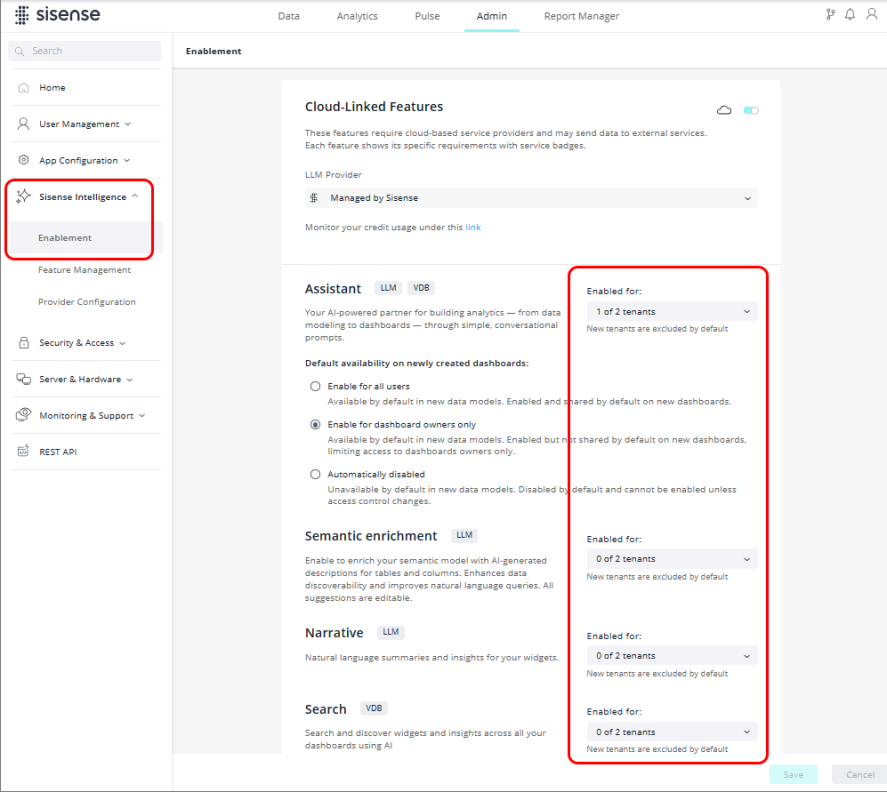
The assistant’s default availability options are still available and are unchanged.
Group level settings are located under Feature Management:
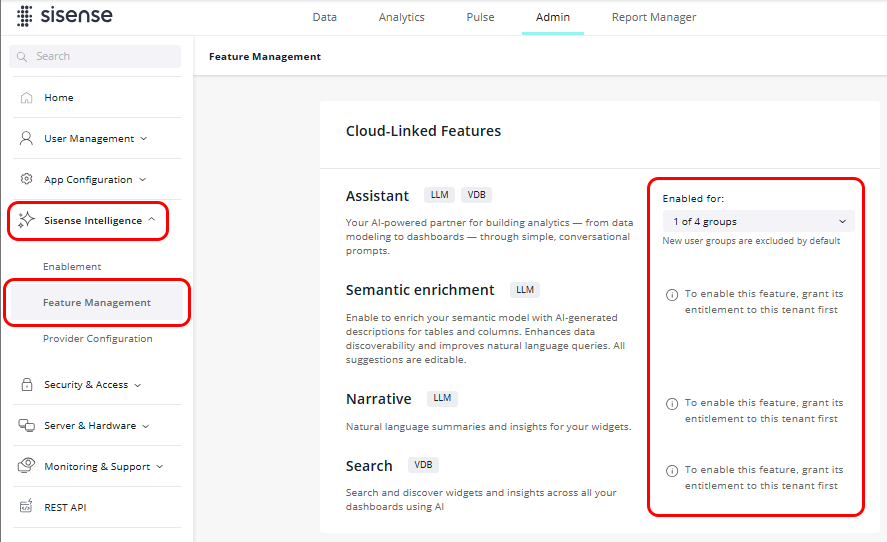
Cloud-linked features (features requiring external LLM/VDB providers; e.g., Assistant, Semantic Enrichment, Narrative, Search) are tagged with their relevant service badges (see image above).
All changes require explicit confirmation via a persistent "Unsaved changes" bar with Save/Cancel actions.
If you encounter issues after an upgrade (e.g., features are disabled), an Admin should verify the settings on the Enablement and Feature Management pages post-migration.
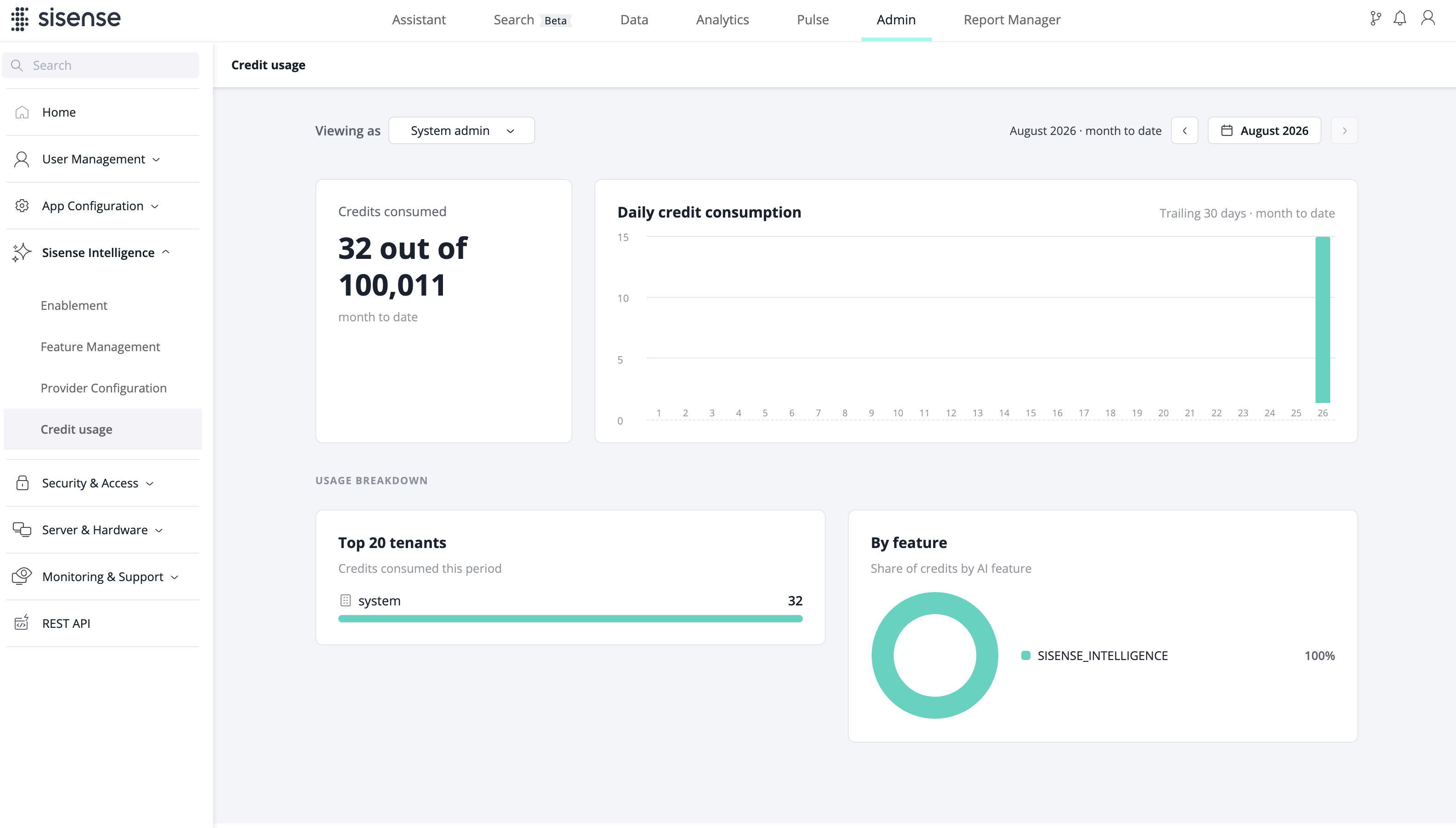
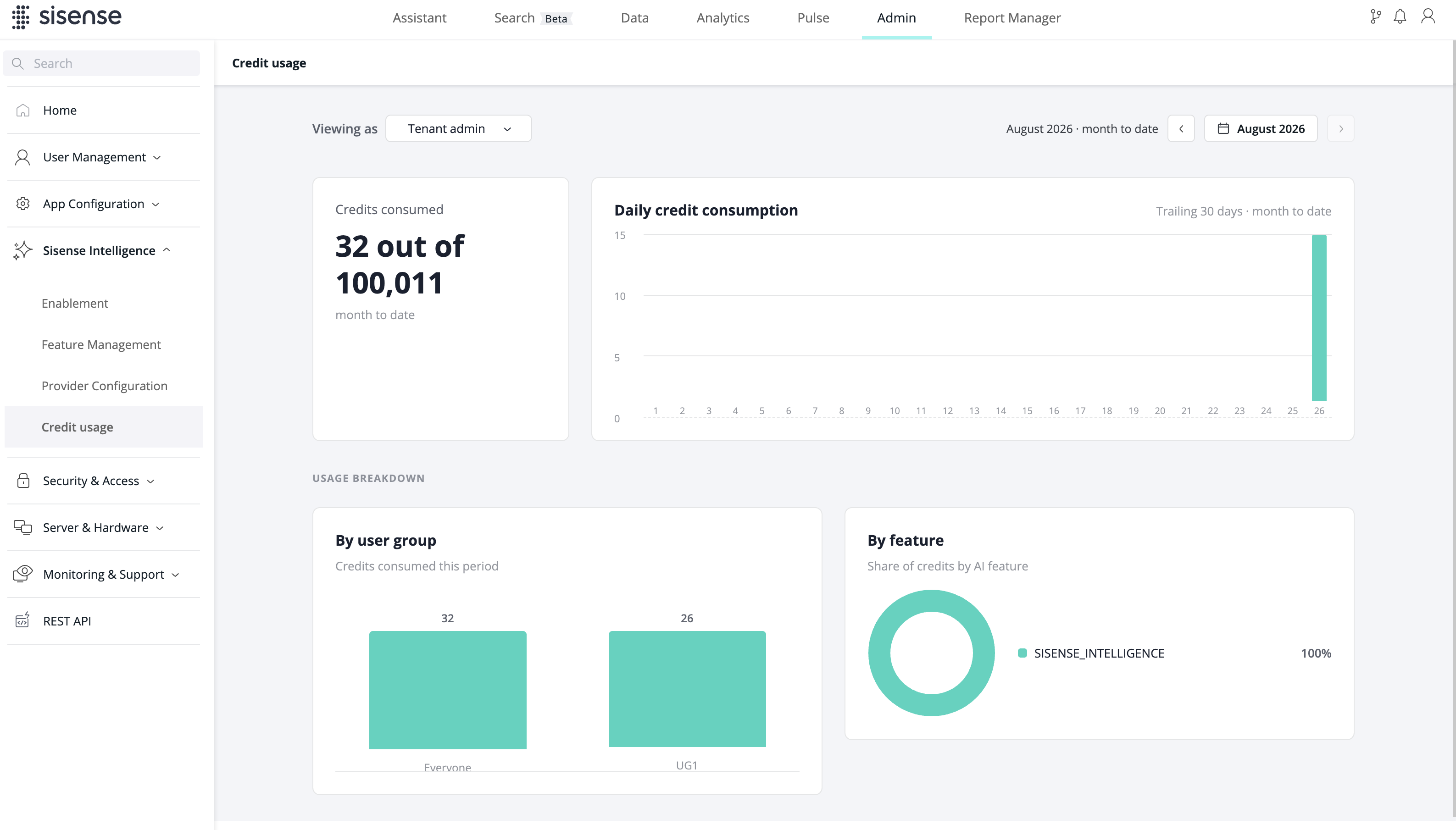
Usage Analytics
A new Usage Analytics dashboard provides real-time monitoring of AI consumption across the deployment:
-
KPI cards: Credits consumed (amount used out of total)
-
Charts: Daily credit consumption (bar chart), by tenant (top 20 tenants), by user group (top 20 user groups), and by feature
-
Filtering: Period selector (month-to-date by default)
The admin view supports dual perspectives — System Admin (full deployment scope) and Tenant Admin (scoped to their tenant) — via a "Viewing as" toggle.
API Support
Management actions are available programmatically via REST API, including feature access control (PUT /ai/features/{scope}) and usage retrieval (GET /ai/usage).
Compose SDK Version
Compose SDK version used in this Sisense release: 2.34.0.
Microsoft Fabric Native Connector
Sisense now includes a native connector for Microsoft Fabric Data Warehouse and Lakehouse SQL analytics endpoints. This integration allows you to query Fabric data for both ElastiCube and Live models.
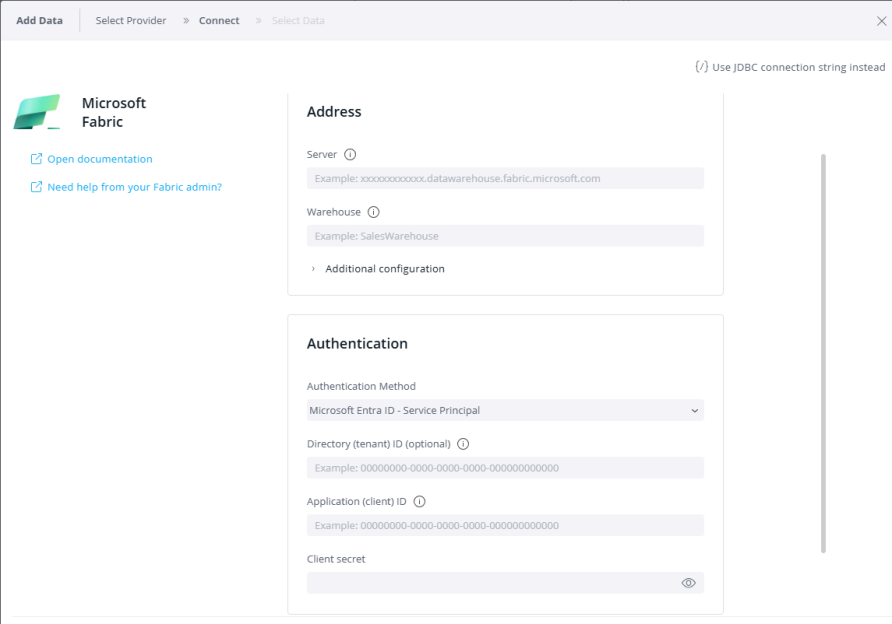
Capabilities and Specifications
-
Full model compatibility — Supports both ElastiCube and Live model architectures
-
Standardized SQL querying — Facilitates communication with Fabric endpoints using standard SQL syntax
-
Service principal authentication — Authenticate via Microsoft Entra ID (Client ID, Client Secret, and optional Tenant ID). This is currently the only supported authentication method
-
SQL-only access — Functional exclusively with SQL query execution; native KQL syntax is currently unsupported
-
Endpoint restrictions — Access is limited to Warehouse and Lakehouse SQL analytics endpoints. Fabric KQL Database, Azure Blob, and hierarchical files (Parquet, Avro, ORC, JSON) are not supported
Min/Max Aggregation for Date Fields
You can now apply MIN and MAX aggregation functions to date and datetime dimensions used as measures in Analytics widgets. This capability is available in Pivot, Table, and Indicator widgets, on both ElastiCube and Live models, enabling you to display the earliest or latest date values for grouped data directly, without relying on workarounds.
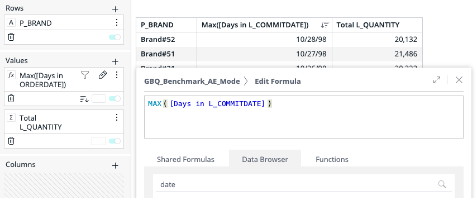
A date measure can be exported to PDF, PNG, CSV, and Excel, matching its on-screen date formatting. You can filter a date measure using relative, from-to, before/after, and include/exclude filters, and rank by it with top/bottom filters. Period-shift functions (PASTYEAR, PASTQUARTER, PASTMONTH, PASTWEEK, PASTDAY, PASTPERIOD) and date-difference functions (YDIFF, QDIFF, MDIFF, DDIFF, HDIFF, MNDIFF, SDIFF) work on date measures the same way they do on numeric measures, provided they are wrapped in an aggregation. PASTPERIOD functions support a date parameter that results in the max date of the past period.
Examples
-
Add MAX([Order Date]) for each customer to a table. This shows you the date of each customer's last order. You can also use it with a rank filter — for example, show the Bottom 10 customers by MAX([Order Date]). This quickly shows you which customers have not ordered for the longest time.
-
Use DDIFF(MIN([Order Date]), MAX([Order Date])) for each customer to see how long they have been a customer. This counts the days between their first order and their last order.
Limitations
-
Calendar-level granularity only — Only Years, Quarters, Months, Weeks, or Days are supported for a date measure; selecting a time-based level (Hours, Every Minute, Round to 15/30 Min) returns a validation error.
-
Date-difference operands — Date-difference functions (YDIFF, QDIFF, MDIFF, DDIFF, HDIFF, MNDIFF, SDIFF) require both operands to be date measures. For example,
DDIFF(MAX([Order Date]), MIN([Ship Date]))works, but combining a date measure with a date field directly, as inDDIFF(MAX([Order Date]), [Ship Date]), is not supported - both sides must be aggregated. -
Range and conditional color formatting — Not yet supported for date measures; support is planned for a future release.
-
Quick Functions and totals — Quick Functions and the totals calculation options are not available for date measures; subtotals and grand totals show the min or max value instead.
-
Compose SDK — Support for date measures in Compose SDK is planned for a future release.
-
Fiscal year models — Support for date measures on fiscal year models is planned for a future release.
-
Export Modifications add-on — When the Export Modifications add-on is enabled, exports from the widget menu do not keep the calendar level of a date measure. For example, a measure shown as 2012 (Years) is exported as the full date.
Pulse (Preview)
You can now create a Pulse by describing what you want watched in your own words.
Open the Sisense Intelligence assistant and describe the thing you care about — a number crossing a line, a top-5 list changing, actuals drifting from plan, etc. Sisense turns that into a Pulse: a saved analysis that runs on your schedule and tells you what it found.
A Pulse differs from a classic Pulse alert in three ways:
-
It watches patterns, not only a single value. A ranking changing position, a value unusual against its own recent history, a measure drifting from another.
-
It reports what it could and could not determine. Where there is not enough data to reach a reliable conclusion, a Pulse reports that explicitly rather than reporting a weak result as a finding.
-
Every run is recorded, whether it found something or not, with the values behind the judgment.
Classic Pulse alerts are unchanged and continue to work exactly as before.
Availability
Preview. Disabled by default, except for a limited number of customers; contact your Sisense representative to enable it on an instance. Requires Sisense Intelligence and a configured LLM. The beta version will be released shortly, along with usage documentation.
Known Limitations in Preview
-
A Pulse can only be created through the AI Assistant. There is no entry point from a dashboard or widget.
-
Slack, Zapier and webhook destinations are set on the Pulse after it is created, not while describing it.
-
External systems cannot query or trigger a Pulse. That arrives at GA.
-
Patterns that compare against previous runs cannot reach a conclusion on their first run — that run records a starting point.
Snowflake Semantic Import into Sisense Model
Sisense now supports automatic import of semantic metadata from Snowflake into the data modeling layer. This capability reduces manual modeling effort and ensures consistency between business logic defined in Snowflake and the corresponding Sisense model.
Key Capabilities
-
Import Semantics toggle — A new option in the Snowflake connector configuration enables or disables automatic semantic ingestion. The toggle is enabled by default.
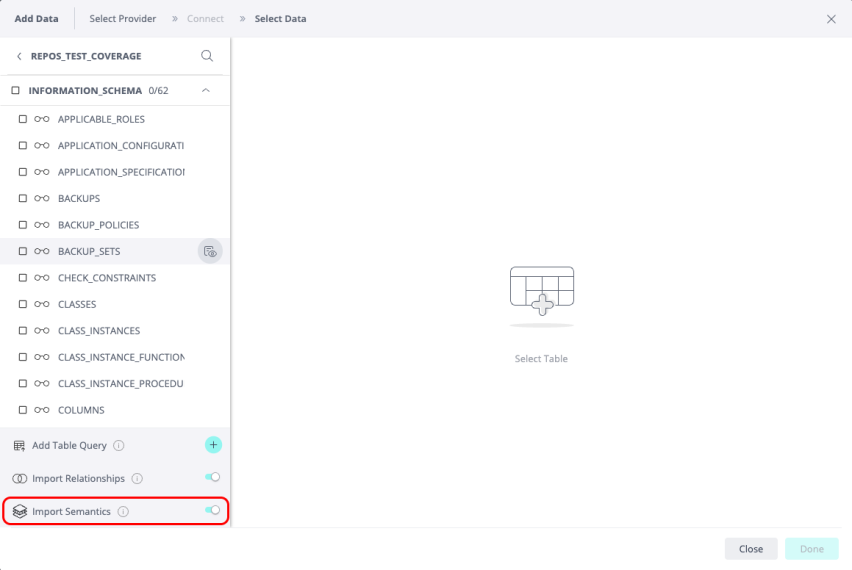
-
Table and column descriptions — Descriptions defined in the data source are automatically imported and populated in the existing description UI within the model editor.
-
Metadata — For Snowflake connections, semantic categories are imported and mapped to tags. Privacy categories are ingested and stored for future AI-workflow integration (UI surfacing planned for a subsequent release).
-
Refresh Semantics — A new menu option allows you to re-import semantic metadata on demand. A confirmation dialog warns that the operation will override existing descriptions.
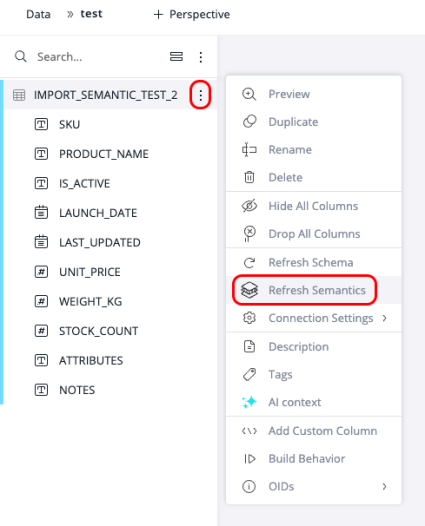
Use case: Organizations that centralize business logic in Snowflake (views, semantic layers, tags, masking policies) can now leverage that metadata directly in Sisense without manual recreation, accelerating model onboarding and improving governance alignment.
Viewer Plus Role (Beta)
A new "Viewer Plus" user role allows users to compose their own dashboards, using widgets created via the assistant and/or copied from another dashboard. Viewer Plus uses the same license as a regular Viewer, allowing customers to define different levels of functionality for dashboard consumers.
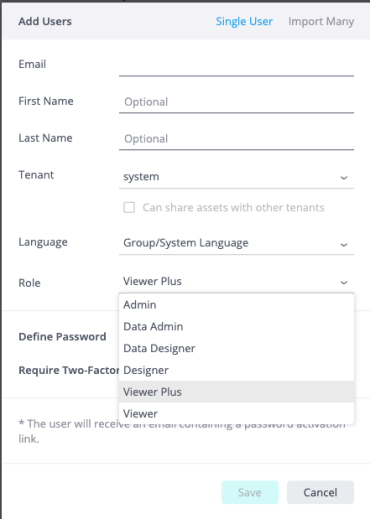
Similar to the Viewer role, Viewer Plus users are not allowed to share dashboards with other users.
If a dashboard is shared to a Viewer Plus user with "Can design" permission, or they created a duplicate copy of a dashboard shared with "Can view" permission:
-
Widgets can be moved, duplicated, renamed, or deleted. The layout of the dashboard can be changed.
-
Users can generate new widgets directly within the assistant and add them to the dashboard.
-
Widget editing is limited to specific aspects (styling, formatting, etc.).
-
The "Restore dashboard" functionality is available as always.
By default, Viewer Plus users receive the following permissions in addition to the default Viewer role:
-
Modify dashboards shared to them with Can design permission.
-
Duplicate a dashboard shared with them (including those with Can view permission).
For dashboards they "own" (they created a duplicate) or that are shared with Can design permission, they will be able to:
-
Rename the dashboard.
-
Delete, rename, duplicate, move, and resize widgets.
-
Add or edit a widget description.
-
Save a new widget from the AI Assistant.
-
Copy a widget from another dashboard (if they own it, or it is shared with Can design).
-
Add a text widget.
-
Toggle edit/view mode (widget layout).
-
Change the dashboard palette.
-
Toggle "update on every change" (filters panel).
-
Set or restore default filters.
When editing widgets, they can:
-
Change the widget type.
-
Modify the widget style (chart sub-type, legend, and all style settings).
-
Modify formatting (numbers/dates) and sorting options on data panel items.
-
Modify color, conditional color rules, and break-by colors on data panel items.
They cannot:
-
Create new dashboards.
-
Share any dashboards with anyone else.
-
Add dashboard or widget filters.
-
Create new widgets with the widget editor.
-
Change data columns, aggregations, formulas, or filters in the widget editor.
-
Import or export dashboards.
-
Organize or move dashboards in folders.
-
Edit dashboard or widget scripts.
We welcome any feedback on Viewer Plus. Contact the customer success team, who will convey your valuable input to help shape this and possible related features in the future.
What’s Improved
Calculated Dimensions
-
The following date diff functions are now supported in Calculated Dimensions: DDIFF, HDIFF, MDIFF, YDIFF. They provide the number of whole days/hours/months/years between two dates.
Syntax
DDIFF(end_date, start_date)
HDIFF(end_date, start_date)
MDIFF(end_date, start_date)
YDIFF(end_date, start_date)
Parameters
-
end_date: the later date. Must be a date/time field or an expression that returns a date/time value.
-
start_date: the earlier date. Must be a date/time field or an expression that returns a date/time value.
The following examples demonstrate usage across all supported providers:
-
Syntax and logic —
DDIFF([receipt date],[ship date])calculates the day-count difference by subtracting the second parameter from the first. This logic is identical for hours, months, and years.-
Supported data types — Parameters accept all types of date/time columns, as well as literal strings in
yyyy-MM-ddoryyyy-MM-dd HH:mm:ssformats.-
Error handling — Providing an unsupported format triggers the following message:
Invalid date ''. Use format 'yyyy-MM-dd' or 'yyyy-MM-dd HH:mm:ss'.
-
-
Conditional parameters — Functions also support nested logic, such as using an IF/CASE clause:
DDIFF([date], CASE WHEN [brand id]>=0 THEN '2009-11-01 00:00:00' ELSE [date] END)
-
-
Tooltip refinements — Documentation within the widget editor has been updated across all date difference functions to clarify that the first parameter represents the end time and the second represents the start time.
-
Filter Widget (Beta)
-
Building on the list-type filter widget introduced in 2026.3.1, this release extends the Filter Widget with criteria-based filtering, additional customization options, and UI/UX refinements.
New Capabilities
-
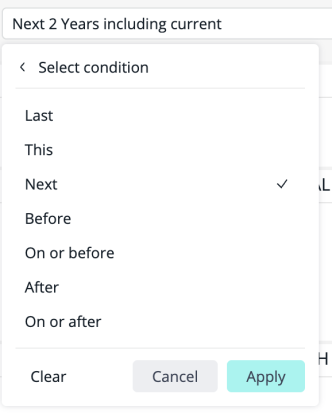
Criteria (conditional) filters — Dashboard designers can now configure filter tiles that use comparison operators such as "more than," "equals," "between," "contains," "is empty," etc. This enables numeric and text-based filtering directly within the dashboard layout, beyond the list-only selection available in the previous release.
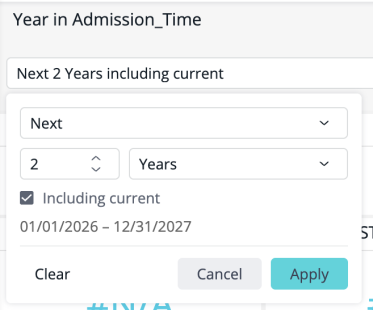
-
Customization options — Filter tiles now expose configuration for input alignment, size, and styling of frame, text, and background colors, allowing designers to match the host application's visual identity without code.
-
Look and feel support for the list dropdown — The filter components now align with the dashboard's look-and-feel settings.
-
Folder and Asset Organization (Beta)
-
Folder and Asset Organization, introduced in 2026.3.1, now includes the following improvements:
-
Improved experience when moving a dashboard/folder into a different folder:
-
Detailed notification about who will get/lose access by inheritance.
-
Notification about missing data source access.
-
-
Notification about unpublished dashboards while sharing a folder, and the ability to publish them directly from the notification popup.
-
Support of report subscriptions for users that get access by inheritance from a folder.
-
Change folder owner, with an option to also change owner for all user-owned assets in the folder.
-
Deleting a folder deletes all user-owned content in it, but retains the assets owned by other users.
-
Administrators can manage folders via the REST API by passing the
adminAccess=trueparameter. -
General bug fixes.
-
MCP Server
-
Following the beta release in 2026.3.1, MCP Server: Remote Hosting and OAuth 2.1 is now generally available (GA).
Sisense Intelligence
-
Managed LLM now powered by Anthropic Claude on AWS Bedrock — Sisense's managed LLM service, available to customers using Sisense Intelligence credits, has migrated from Azure to Anthropic Claude models hosted on AWS Bedrock.
What's New
-
AI model optimization — Sisense Intelligence now uses Claude Sonnet 4.6 for tasks requiring strong reasoning, such as the Assistant, and Claude Haiku 4.5 for lighter tasks such as narrative insights and semantic enrichment.
-
Region-specific processing — Requests continue to be processed in the region group that matches your deployment: EU-hosted instances process in the EU, while all other regions process in the US.
-
Deployment scope — This change applies to Sisense-managed cloud deployments and occurs automatically upon upgrade. Self-hosted deployments are not affected.
-
Bring Your Own LLM (BYO LLM) — For customers who prefer to run Sisense Intelligence on their own models, Bring Your Own LLM continues to support Azure OpenAI, OpenAI, and AWS Bedrock.
-
No action required — Existing AI features remain fully functional and unchanged.
-
What’s Fixed
Add-ons
-
Tabber - Previously, in the Tabber widget, tab labels and icons (such as the eye icon in the "Displayed widgets" list) were unreadable when using dark dashboard themes. The widget now correctly inherits colors from the active dashboard theme, ensuring all UI elements remain visible and legible on both light and dark backgrounds.
-
Jasper Reports - Previously, when Dynamic ElastiCube switched a shared dashboard to a different data model, recipients who received a scheduled Jasper PDF export saw data from the old data model instead of the new one, unless having had opened the dashboard after the Dynamic ElastiCube configuration change. This has now been fixed, such that Jasper exports read the updated data model, ensuring the recipients get the correct data, regardless of opening the dashboard.
APIs
-
Previously, there was a performance issue where retrieving a list of dashboards within a folder via
/api/v1/dashboardscaused significant API latency. The system issued a separate database lookup for each dashboard to retrieve its folder information, even when multiple dashboards shared the same folder. The API now uses a single batched query to retrieve folder details for the entire list, resulting in faster response times when working with folders containing many dashboards.
Assistant
-
Previously, the assistant would sometimes suggest follow-up actions, such as currency conversions, that were outside its supported capabilities. The assistant has been updated with a more accurate definition of its skills and limitations to ensure it only offers supported actions. Additionally, the assistant now handles forecasting more gracefully; if a forecast fails due to insufficient data points, it will suggest increasing the data granularity (e.g., switching from monthly to weekly views) to provide a valid result.
-
Previously, the assistant's natural language queries (NLQ) could produce incomplete filters when users requested to include or exclude specific values from a column. The assistant now includes a data preview capability that allows it to accurately identify and apply all relevant column values when generating filters, ensuring more precise and reliable query results.
-
Hidden-column settings from AI Context are now enforced for Viewers.
-
Errors that previously occurred when refreshing the browser or opening a chat from a direct link have been fixed.
-
Previously, the assistant components did not always correctly inherit custom branding and white-labeling settings. Certain UI elements like the chat sidebar, tool cards, and input fields would ignore tenant-specific design configurations (such as dark backgrounds or custom fonts) and could appear with incorrect colors or styles due to CSS overrides. This fix ensures that the assistant's UI now consistently reflects your organization's white-labeling settings, including navigation backgrounds, widget colors, and toolbar styles.
BloX
-
Previously, in BloX, custom actions could not be edited or reused if the "Action Name" (Step 1) was changed to a different "type" value in the JSON (Step 2) during creation. This fix ensures that the action's type is consistently used as the key across all internal stores, preventing data divergence. Additionally, a self-healing mechanism was implemented to automatically restore and make editable any previously broken actions when they are opened in the editor.
Calculated Dimensions
-
Resolved inconsistencies in date diff (XDIFF) function behavior within Calculated Dimensions across multiple SQL dialects. All providers now return unified results when using XDIFF functions in Calculated Dimensions, and the associated feature flag has been removed to enable these functions in production.
Data
-
Previously, datasets configured with a cross-tenant connection became inaccessible after upgrading to version 2026.3. When a dataset in a child tenant referenced a connection owned by the System Tenant, the Connection Management enforcement (introduced in L2025.4.0) blocked cross-tenant connection resolution, causing the dataset to appear as "Custom Tables" and manual builds to fail with error
3404 Undefined connection. A validation check has been implemented to prevent cross-tenant connection assignments; it is no longer possible to add or switch a dataset to a connection belonging to a different tenant.
Export to PDF
-
Previously, in PDF exports, rows in pivot tables were sometimes cut off or visually truncated at the bottom of the page. This occurred when a page break landed in the middle of a merged cell (rowSpan). The export logic now correctly identifies these merged groups and ensures they start on a fresh page if they fit within a single page, preventing content from being cut.
Note:
If a single cell's content is taller than a full page, its text will be repeated in full on each page the merged cell spans, rather than being split — this edge case is not addressed by this fix.
Filters
-
Previously, toggling a filter on one dashboard could silently fail to save after visiting another dashboard. This occurred because internal references to a previously visited dashboard's widget list were not properly cleared, causing an error that interrupted the save process. Filter changes now persist correctly regardless of the navigation sequence between dashboards.
-
The search experience in filter popups has been improved by implementing relevance-based sorting for search results. Previously, when searching for a specific value, exact matches were not prioritized and could be buried among many partial matches, making it difficult to find the intended item. With this update, search results are now ranked by relevance, prioritizing exact matches first, followed by values starting with the search term, and then other partial matches, ensuring that the most relevant results appear at the top of the list.
Infra
-
Previously, application restores sometimes failed on environments using MongoDB 8.0. The Sisense CLI (
si system restore) now correctly handles MongoDB 8.0 metadata, ensuring that backups can be successfully restored through all supported paths.
Narrative
-
Previously, the Narrative (Sisense Intelligence) feature did not support Forecasting and Trend widgets, meaning it could not recognize future or incomplete time periods (e.g., identifying that a future month has not yet occurred). The Narrative logic has been extended to fully support these widgets, allowing the AI to generate accurate descriptive text that accounts for forecast data and future timeframes.
Natural Language Query (NLQ)
-
Previously, multi-measure Natural Language Query (NLQ) questions (e.g., "What is X and Y?") failed with a
400 query_state_generation_failederror when using the Bedrock Nova LLM. This fix ensures that multi-measure queries are now correctly handled, allowing users to successfully ask compound questions when Bedrock Nova is the active LLM. -
Previously, slow-but-valid AI-powered queries (NLQ) would fail with a 500 error after 30 seconds, even if the system was still successfully processing the request. The timeout for these queries has been increased to 130 seconds to accommodate complex data fetches and ensure that users receive the generated results or a specific error message rather than a generic connection failure.
Report Manager
-
Previously, in Report Manager, some combined Excel exports would trigger a "problem with some content" warning when opened in Microsoft Office 365. This occurred when widget titles exceeded 31 characters or contained invalid characters (such as
\ / ? * [ ] :). A new global setting, "Sanitize Excel Sheet Names," has been added; when enabled, it automatically truncates and cleans sheet names to ensure compatibility with Excel's naming limits while maintaining uniqueness. -
Previously, in Report Manager, CSV and non-combined Excel exports systematically appended a sequential index (e.g.,
_1,_2) to filenames, even for single-widget reports or unique widget names. This behavior often disrupted automated workflows that rely on static filenames.A new tenant-level setting,
index_duplicate_attachment_names_enabled, has been introduced (defaulting tofalse). When this setting is enabled, the system will only append a suffix if a genuine naming collision is detected between widgets in the same report, ensuring that unique widget names result in clean, predictable filenames. -
Previously, CSV and Excel reports sent via Report Manager sometimes ignored "Relationship Filters" (OR logic) and defaulted to "AND" logic, resulting in incorrect data and fewer rows compared to the dashboard UI. This occurred because the Report Manager service was using a stale, cached version of the filter configuration instead of the live platform settings. Exports now correctly reflect the current "Filter Relationship" settings.
Search
-
Previously, semantic searches for widgets and dashboards within a specific scope (such as those filtered by user permissions) were not correctly utilizing keyword matching and field weighting. These scoped searches relied solely on vector-based results, which could lead to less relevant search outcomes. The search index has been updated to ensure that both lexical (keyword) and vector branches contribute to the final search results, providing more accurate and weighted results for all filtered searches.
Semantic Enrichment
-
Previously, Semantic Enrichment sometimes failed to update tables in BigQuery Live models. This fix addresses several underlying data processing errors, including incorrect SQL generation for custom columns, improper handling of CASE statements, and inaccurate calculation of column statistics (such as null counts and repeating values). You can now successfully run Semantic Enrichment on BigQuery Live models to improve your data analysis capabilities.
Services
-
Previously, the
external-pluginspod could enter aCrashLoopBackOffstate during a RabbitMQ reconnection. This occurred because theedm-serviceincorrectly re-declared theall-user-changedexchange with thedurableflag set tofalse, conflicting with the existingtruesetting. The fix ensures that exchange options are persisted and correctly applied during reconnection, preventing service crashes.
Shared Formulas
-
Previously, shared formulas were restored and remained editable on dashboards connected to mismatched data sources (ElastiCubes), leading to unintended cross-datasource updates. Validation logic now compares the dashboard's data source against the shared formula's original data source and suppresses formula restoration upon detecting a mismatch.
Note:
Shared formulas no longer persist or propagate across differing data sources. Workflows relying on cross-datasource formula leakage will need to define formulas explicitly per data source.
Widgets
-
Previously, in Pivot widgets, duplicating a column three or more times caused some instances to display raw integer dictionary IDs (e.g., "1") instead of the correct text values or empty spaces. This occurred due to a mapping error in the translation service when handling multiple projections of the same physical column. This has now been fixed and works as expected.
-
Previously, in the Filter widget, clicking "Select all" in the drop-down only selected the filter members that were currently visible in the UI due to lazy loading. The "Select all" option now correctly includes all members in the filter, regardless of whether they have been loaded into the dropdown view, and the filter tile will accurately display "Include all."
-
Previously, legend items and chart segments (in Donut and Line charts) remained greyed out or appeared in a lighter shade after being re-enabled, if the widget had been exported as an image while those items were disabled. This has now been fixed and works as expected.
-
Previously, Table widgets would occasionally appear blank (displaying only the title) after toggling columns on or off. This occurred due to a race condition where the widget attempted to render headers before the corresponding data update was complete, resulting in a "Requested unknown parameter" error. The widget now correctly synchronizes the rendering process to ensure data and headers match, preventing the blank display.
-
Previously, missing values in text columns within Table widgets were incorrectly displayed as
N\Ainstead of the expected#N/Awhen themissingValues.returnNullssetting was enabled. This fix ensures consistent representation of missing values across all data types and widgets, including charts and indicators. -
Previously, Pivot and Table widgets using "Weeks" granularity and a custom date format (e.g.,
M/d) sometimes displayed a different date in the UI than in exported CSV or Excel files. This occurred when the system was configured with specific translation strategies (OLD_ONLYorOLD_THEN_NEW), causing the widget to incorrectly snap the date to the start of the week while the export correctly used the representative date. The widget now consistently displays the same representative date as the export, ensuring data consistency across the platform.