AI Context (Beta)
Last updated: September 10, 2026
| Tier | Deployment |
|
|
|
Availability: Managed (cloud) and self-hosted deployments · Beta.
-
AI Context is consumed by the assistant and NLQ. It is planned to be consumed by Narrative and Semantic Enrichment in a subsequent release. Getting the most out of it also requires Cloud-Linked Features and a configured LLM. See Generative AI for setup details.
AI Context lets data designers and dashboard creators write short, plain-language instructions that describe how a data model, table, column, dashboard, or widget should be understood or used by AI. A data model's schema tells Sisense Intelligence what the data is; AI Context tells it things a schema cannot express on its own, for example what "last quarter" means in your fiscal calendar, that "revenue" should use the net measure, that amounts are in USD, or which terminology your users prefer. Sisense includes this text, alongside the schema it generates automatically, whenever the assistant or NLQ needs to reason about that object, so answers and generated queries reflect your own terminology and conventions instead of a generic default.
AI Context vs. Descriptions vs. Tags
| Metadata | Answers | Purpose | How it is set |
|---|---|---|---|
| Description | What is this? | Documents the object factually and feeds the semantic layer. | Automatically via Semantic Enrichment, or manually. AI-generated descriptions are marked with the Sisense Intelligence icon so you can tell them apart from text you wrote yourself. so you can tell them apart from text you wrote yourself. |
| Tags | Which category, and any governance flags? | Classifies objects and drives governance, for example excluding a field from AI. | Manually. |
| AI Context | How should AI interpret or use this? | Gives the AI targeted, plain-language guidance it can't infer from the data. | Manually, up to 500 characters. |
A simple way to remember it: descriptions describe, tags classify, AI Context instructs.
The Same Object, Three Ways
Take the Revenue (Net) column on the Orders table:
| Metadata | Role | Value for Revenue (Net) |
|---|---|---|
| Description | What it is | "Net revenue per order line, after refunds and discounts. Numeric, in USD." |
| Tags | Classification and governance | measure, finance |
| AI Context | How to use it | "Use this for all revenue questions unless the user says 'gross'. Amounts are in thousands." |
The description documents the field, the tags classify it, and the AI Context tells the AI how to choose and read it. They do not overlap, each adds something the others cannot.
Tip:
Do not repeat the description inside AI Context. If a sentence explains what a field is, it belongs in the description. Reserve AI Context for the how: meaning, preferred usage, and caveats.
For the full sequence, and how AI Context relates to Descriptions and Tags, see Optimizing Your Data Model for AI.
Important: AI Context is Guidance, Not a Rule
AI Context is soft guidance that the AI takes into account. It is not an enforcement mechanism, a guardrail, or an access control. It cannot guarantee that the AI will refuse a request, hide a field, or never do something. The AI treats AI Context as helpful direction and may not honor absolute or negative rules.
If you need a hard rule, use the right tool for it:
-
To keep a field or table out of AI entirely, use the governance option that excludes it from AI. This is enforced.
-
To control how data can be combined or sliced, model it in your data model: relationships, hidden fields, and Perspectives that expose only what should be queried.
Do not write:
"This table cannot be grouped, sliced, or filtered by Customers (DimCustomers). If users ask, tell them it cannot be calculated."
This is a rule, not context. Because AI Context isn't enforced, the AI may still attempt the breakdown. Instead, either remove the relationship or hide the dimension in the model so the combination is not possible, or phrase the guidance positively:
Write instead:
"Revenue here is pre-aggregated at the account level. Break it down by Account or Region, not by individual customer."
Data Assets Where You Can Add AI Context
AI Context is available at every level of your analytics stack:
-
Data models — context that applies across the whole model
-
Perspectives
-
Tables
-
Columns
-
Dashboards
-
Widgets
-
Shared formulas
When more than one level applies, the most specific context available takes priority. For example, AI Context on a column is used ahead of AI Context on its parent table, and AI Context on a widget is used ahead of AI Context on its parent dashboard.
Adding AI Context
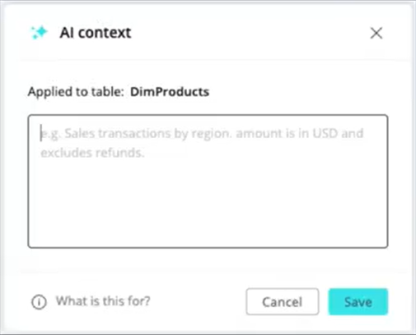
The same AI context dialog is used at every level. Its header updates to show exactly what you're annotating, for example Applied to table: DimProducts, Applied to column: OrderDate, or Applied to model: Sales.
Data Models, Tables, and Columns
-
Open the Data tab and select the relevant data model.
-
Switch to List View (as with Semantic Enrichment and Smart Value Matching) to see the model's tables and columns.
-
Select AI Context:
-
Diagram view - In the data objects panel, next to the data asset that you want to annotate, click
 > AI Context
 -
List view - next to the data asset that you want to annotate, click

-
-
In the AI context dialog, enter your instructions in plain language. For example: "Sales transactions by region. Amount is in USD and excludes refunds."
-
Click Save.
Dashboards and Widgets
-
Open the Analytics tab and open the relevant dashboard.
-
For dashboard-level context, click
> AI Context. -
For widget-level context, open the widget's options menu and select AI Context.
-
Enter your instructions and click Save.
Note:
Each AI Context field accepts up to 500 characters. Click What is this for? in the dialog for a short reminder of how the text is used.
Writing Effective AI Context
Good AI Context is short, specific, and about meaning or usage, not a restatement of the name or a rule you expect to be enforced. Write it when the AI cannot infer something from the data alone, for example:
-
Business meaning: "'Active' means a user with at least one login in the last 30 days."
-
Preferred terminology and synonyms: "Users often call this 'churn'; treat 'churn rate' and 'attrition' as this metric."
-
Units and scale: "Amounts are in USD, in thousands."
-
When to use a measure: "Use Revenue (Net), not gross revenue, for revenue questions unless the user says 'gross'."
-
Known caveats: "Data before 2021 is partial; note this when trends span that period."
| Weak | Better |
|---|---|
| "Sales table." restates the name | "Line-level order data. One row per order line; sum Quantity, don't count rows, for units sold." |
| "Do not use this column." a rule, unenforced | "Legacy field kept for reference; prefer Revenue (Net) for revenue questions." |
| "Customer info with lots of details." vague | "Customer dimension. 'Region' is the sales region, not the billing country." |
Examples at Each Level
The same running model, annotated at every level the assistant and NLQ use:
-
Model: "Fiscal year starts February 1. 'Last quarter' means the last completed fiscal quarter."
-
Table, Orders: "One row per order line. Sum Quantity for units sold; don't count rows."
-
Column, Revenue (Net): "Use for revenue questions unless the user says 'gross'. USD, in thousands."
-
Shared formula, Active Users: "Use this measure when users ask about 'active', 'engaged', or 'MAU'."
When more than one level applies, the most specific one wins. Column context is used ahead of its table, and table ahead of the model.
See the Difference: With and Without AI Context
Without AI Context
Q: "What was revenue last quarter by region?"
A: Returns gross revenue for the calendar quarter, July to September. Technically valid, but the wrong measure and the wrong calendar for this business.
With AI Context
Model context: "Fiscal year starts February 1; 'last quarter' means the last completed fiscal quarter." Revenue (Net) context: "Use for revenue questions unless the user says 'gross'."
Q: Same question.
A: Returns Revenue (Net) for fiscal Q3, November to January, by region, matching how the business actually reports.
AI Context vs. Smart Value Matching
If you want the AI to recognize the values inside a column, a user typing "northeast" matching a region stored as "NE Region", use Smart Value Matching, not AI Context. AI Context is about how to interpret the object. It is not a synonym list for a column's values.
Is More Always Better?
No. Clean names and descriptions are the foundation and should be broad. AI Context is targeted, added only where the model genuinely can't express something, or where you've seen the AI get it wrong.
Piling on redundant or verbose context dilutes the guidance and can make answers worse, not better. Each field is limited to 500 characters, which is about one clear idea.
Where AI Context Is Used
Sisense includes AI Context, alongside the schema it generates automatically, wherever an AI feature reasons about the annotated object:
-
Assistant and NLQ: The assistant's natural language engine uses AI Context to choose the right tables, columns, and values when it turns a question into a query. These are the features that use AI Context today.
-
Narratives: Narrative uses AI Context when generating textual summaries of widgets. This is not available in the beta phase; it is planned for a subsequent release.
-
Semantic Enrichment: Semantic Enrichment takes AI Context into account when generating table and column descriptions. This is not available in the beta phase; it is planned for a subsequent release.
Limitations and Known Issues
-
This feature is currently in Beta. Functionality and behavior may continue to change before general availability.
-
Each AI Context field is limited to 500 characters.
-
AI Context requires an environment that supports the AI fields API. Where that API is not yet supported, the AI Context option is not available, and existing assistant, NLQ, Narratives, and Semantic Enrichment behavior is unaffected.
-
AI Context is always written manually; it is not AI-generated, unlike Descriptions, which can be generated automatically via Semantic Enrichment.
-
You can add AI Context to an object if you have permission to edit that object, for example edit permissions on a data model for its tables and columns, or design permissions on a dashboard for the dashboard and its widgets.
-
AI Context is guidance, not enforcement. See AI Context is guidance, not a rule, above.