AI Credit Usage and Allocation
Last updated: October 28, 2026
| Tier | Deployment |
|
|
|
Sisense Intelligence features that use the Sisense-managed LLM consume Sisense credits. In the Admin tab, under Sisense Intelligence, admins can:
-
Credits & Allocations: Set monthly credit budgets per tenant and user group, add credits during a cycle, and track utilization. See Allocating Credits.
-
Credit usage: Monitor AI consumption in the Usage Analytics dashboard. See Monitoring Credit Usage.
Note:
Credits apply only to the Sisense-managed LLM. If you use your own LLM provider, consumption is billed by your provider and is not tracked here.
Monitoring Credit Usage
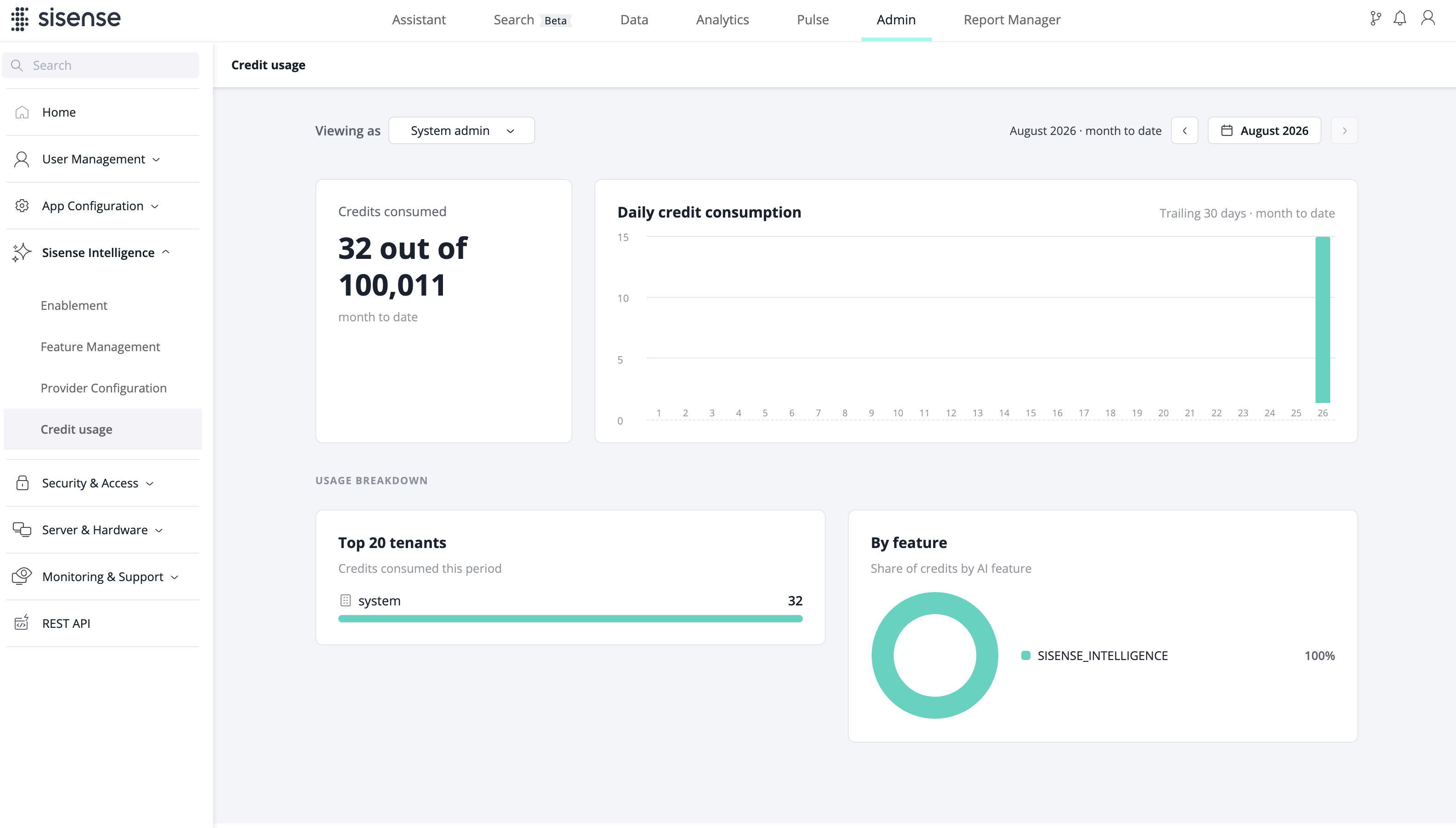
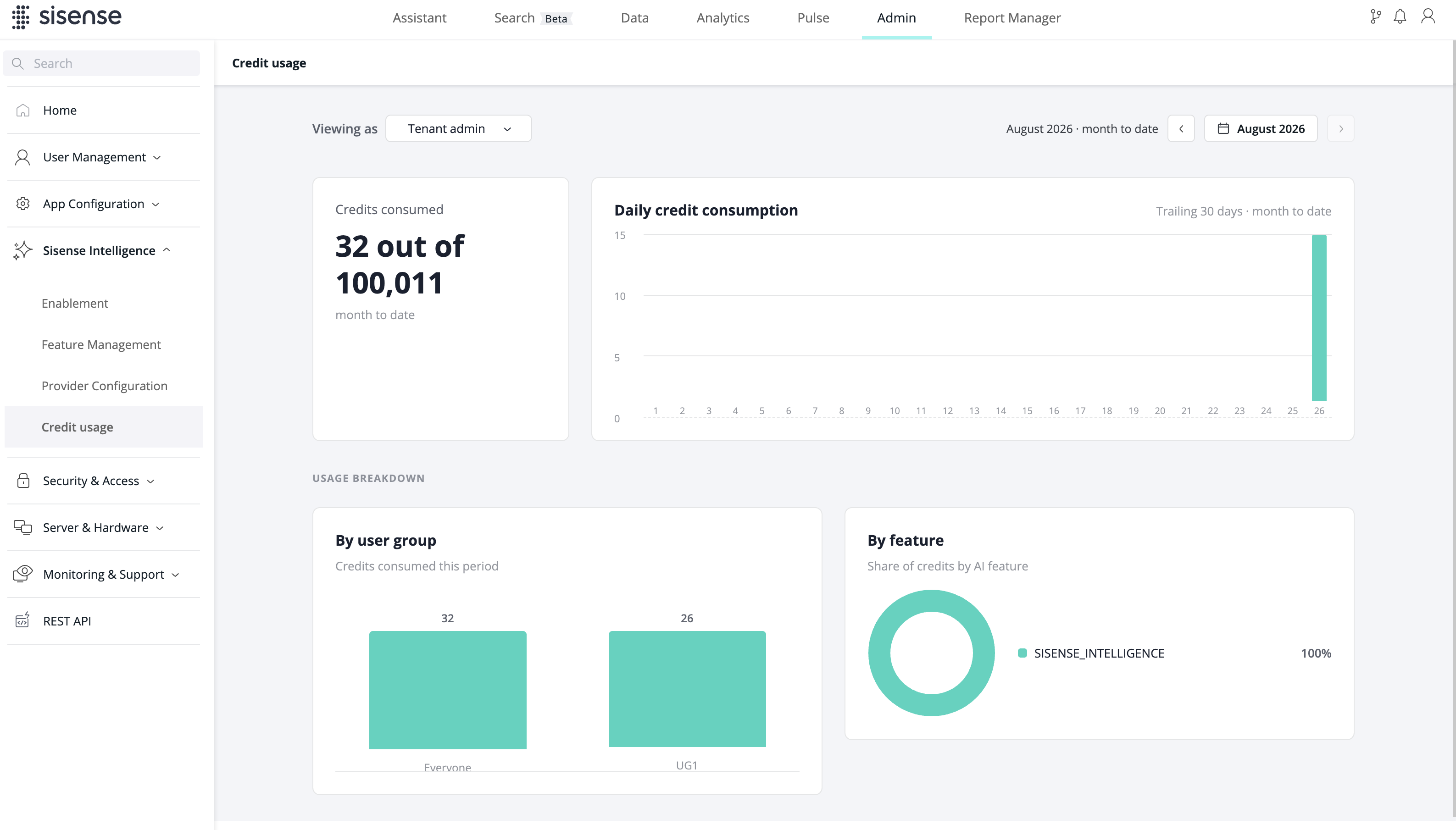
Under Sisense Intelligence > Credit usage, the Usage Analytics dashboard provides real-time monitoring of AI consumption across the deployment:
-
KPI cards: Credits consumed (out of the allocated total), query success rate, estimated LLM cost (month to date), and active AI users
-
Charts: Daily credit consumption versus budget, consumption by tenant (top 20 tenants), by user group (top 20 user groups), and by feature, and the top credit consumers
-
Filtering: Period selector (month-to-date by default)
The admin view supports dual perspectives — System Admin (full deployment scope) and Tenant Admin (scoped to their tenant) — via a "Viewing as" toggle. If multitenancy is not enabled, only the System Admin view is available.
Note:
A user who belongs to several user groups counts toward each group, so user group figures can overlap and may not add up to the tenant total.
Allocating Credits
On the Credits & Allocations page, admins set a monthly credit budget for each tenant and user group. A budget is shared across every credit-based AI feature enabled for that tenant or group.
-
System Admins allocate the deployment's credits to tenants, and the system tenant's credits to its user groups.
-
Tenant Admins allocate their tenant's credits to its user groups.
IMPORTANT:
Tenants and user groups have no credits by default. Users can use credit-based AI features, such as the Assistant, only after credits are allocated to their tenant and user group.
How allocations apply:
-
Monthly cycle: Allocations are monthly budgets. The Credit utilization card shows the percentage used, the used and total credits, the remaining balance, and the reset date.
-
Users in multiple groups: A user gets the highest single group allocation. Allocations are not added together. For example, if a user is in Group 1 (100 credits) and Group 2 (250 credits), their allocation is 250 credits.
-
Split equally: This option divides a user group's credit pool evenly among the group's members.
-
Adding credits during a cycle: You can increase an allocation at any time. The added credits are available right away, and credits already consumed in the cycle are not reset.
-
Limit reached: When a tenant's or user group's allocation is used up, its users can't use credit-based AI features until the cycle resets or more credits are allocated.
-
Allocation ceiling: No single tenant can be allocated more than the deployment's total credits. No single user group can be allocated more than its tenant's allocation. Combined allocations can exceed the pool. The page then shows the excess as credits overallocated, and usage is limited by the pool's remaining balance.
Note:
Consumption is recorded with a short delay, so usage can slightly exceed an allocation before AI features are blocked.
To allocate credits:
-
In the Admin tab, go to Sisense Intelligence > Credits & Allocations.
-
System Admins: select the Tenants or Groups scope.
-
To set one allocation, click the edit icon in the Credits/mo column, enter an amount, and press Enter.
-
To split credits equally across several rows, select the rows and click Quick allocate. The amount defaults to all remaining unallocated credits. Edit it if needed, then click Apply.
Managing Credits via REST API
Credit allocation, per-user credit limits, and a user's effective (resolved) credit balance are available via the REST API, alongside the feature-management endpoints.