Renaming Fields in Widgets
Last updated: June 11, 2026
| Tier | Deployment |
|
|
|
The names of fields in widgets are taken from the raw data. To make these names more comprehensible, you can rename the fields in your widget.
To rename a field in a widget:
-
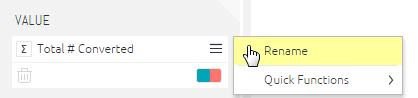
In the Widget Designer, right-click on a field, for example, in the X-AXIS, Y-AXIS, VALUES, CATEGORIES areas and so on.
-
In the menu, select Rename.
Note:
Renaming a field only affects how it is displayed in the current widget. This field's name is not affected in the Data Browser or in other widgets in the dashboard.