Working with ElastiCube (EC) Cloud
Setting the Build Destination and Naming the Model
- Open the Data tab and click +ElastiCube. The Add new ElastiCube Model window appears.
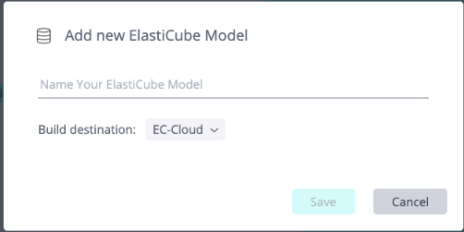
- Ensure that the Build destination is set to EC-Cloud (which is the default).
- Enter a name for the ElastiCube model and click Save.
Select Build Behavior for ElastiCube Cloud
Build behavior for any table is Replace, by default. After the first full build, you can change the build behavior for a table as required. For EC Cloud, the build behaviors, Incremental and Upsert, are in addition to the other build types that are relevant also for ElastiCubes.
- In the Data Model, click the table, click the 3-dots menu, and select Build Behavior.
_453x662.png)
- Select a build type:
- Incremental - Inserts new data only, based on a specific column. Each build inserts only the rows added
since the last build:
- New data defined by: Select a specific integer or date column used to determine whether to accumulate data at the time of the build
- Update Insert (Upsert) - Update else Insert. Inserts new data and updates existing data, based on a
unique key:
- New data defined by: Select a specific integer or date column used to determine whether to accumulate data at the time of the build
- Insert/Update defined by (Unique Key): Adds new rows to the table for data that does not already exist based on a unique key
- Incremental - Inserts new data only, based on a specific column. Each build inserts only the rows added
since the last build:
- Click Apply.
See Defining ElastiCube Build Settings for other build types.
Adding a Custom Table or Custom Column for ElastiCube Cloud
When building to EC Cloud, Sisense SQL is the default dialect, which is the same as an ElastiCube build:
- You can change the default dialect and select the destination database dialect.
.png)
- For a custom table, you can change the dialect to the destination database dialect only after a full build has run at least once. See Adding Custom Tables for more information.
- For
a custom column:
- You must set an update sql for the column. This can be done before a full build.
- Data type is string, by default. You can change the data type in the model after creating a custom column. See Adding a Custom Column for more information.
Setting Result Limits and Query Timeouts per ElastiCube Cloud Model
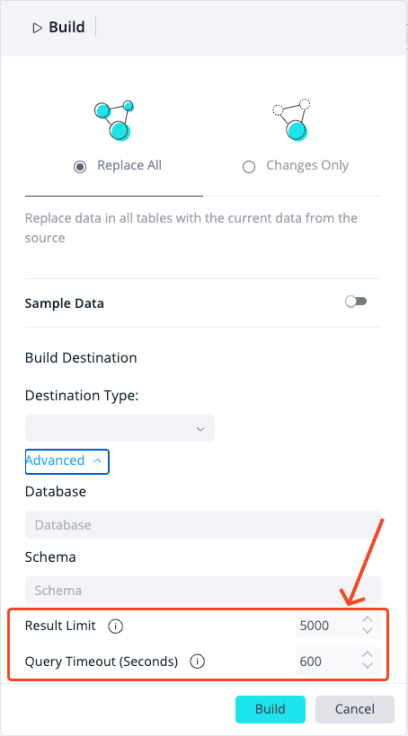
You can set additional configurations per EC Cloud data model:
-
Result Limit - Defines the maximum number of records a query can return
-
Query Timeout - Specifies the maximum time, in seconds, to wait for a response from the database before the query is canceled
Both settings can influence costs when using remote data warehouses, as charges are based on compute time. It is recommended to limit the number of records to reduce query complexity, while setting a timeout to prevent long-running queries, helping to optimize performance and manage expenses.