Data Flow Per Feature
Last updated: June 11, 2026
| Tier | Deployment |
|
|
|
This topic details what data is sent, what is stored, and how each feature processes it.
Assistant - Asking a Natural Language Query
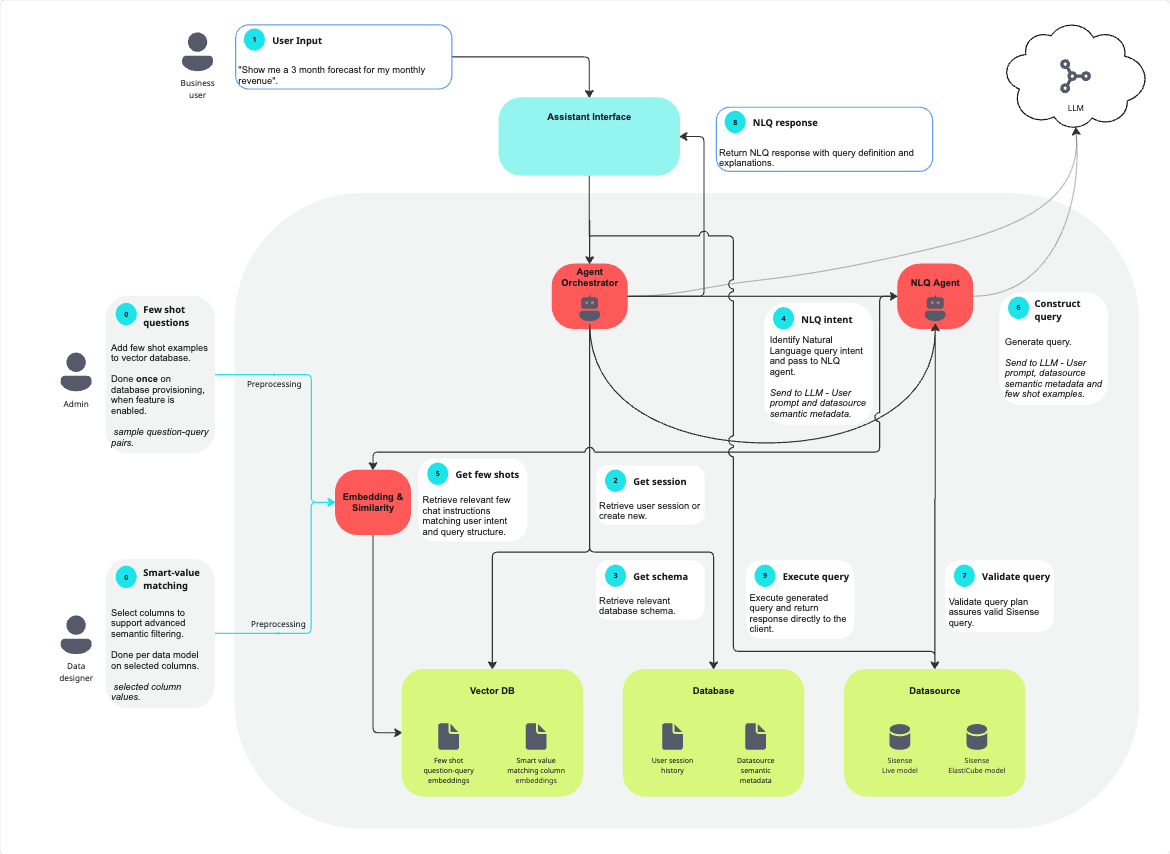
The assistant is a cloud-linked feature; it requires an LLM and VDB.
Data sent to the LLM:
-
User prompts submitted through the assistant
-
Datasource semantic metadata (e.g., table names, column names, relationships, and data types)
-
Few-shot question-query examples
-
Aggregated query results (used by the narrative feature)
Data stored in the Vector DB:
-
Few-shot question-query examples: Customer data is never utilized for this purpose
-
Column values from smart value matching enabled columns: Data designers explicitly select which columns will be supported
When a user submits a natural language query (NLQ) through the assistant, the prompt is sent from the Sisense web client to the Agent Orchestrator service. The Agent Orchestrator retrieves or creates a chat session, storing the session state in Sisense’s database so that conversational context is preserved. It then fetches the relevant model schema and semantic metadata from the Sisense database, including tables, fields, and descriptions, and passes this along with the user’s prompt to the NLQ Agent.
The NLQ Agent determines the query’s intent and extracts measures, dimensions, filters, and any chart preferences. The system retrieves relevant few-shot examples from the VDB seeded with relevant NLQ-to-query mappings examples, to guide LLM prompt construction. The NLQ Agent then calls the external LLM, sending the prompt, schema, and few-shot examples to the LLM endpoint via secure API. The LLM returns a generated Sisense query to the NLQ Agent. If filters with value members are involved in the query, the NLQ agent matches the values given by the user with the best semantic match stored in the vector db (only columns selected in smart value matching are supported). The value matching step occurs after the last turn to the LLM and does not involve the LLM.
The NLQ Agent validates the returned query against the datasource by creating a query execution plan. If valid, the query is returned to the user’s browser. The browser executes this query against the connected datasource, either a Live model or ElastiCube, and the widget is displayed.
Narrative
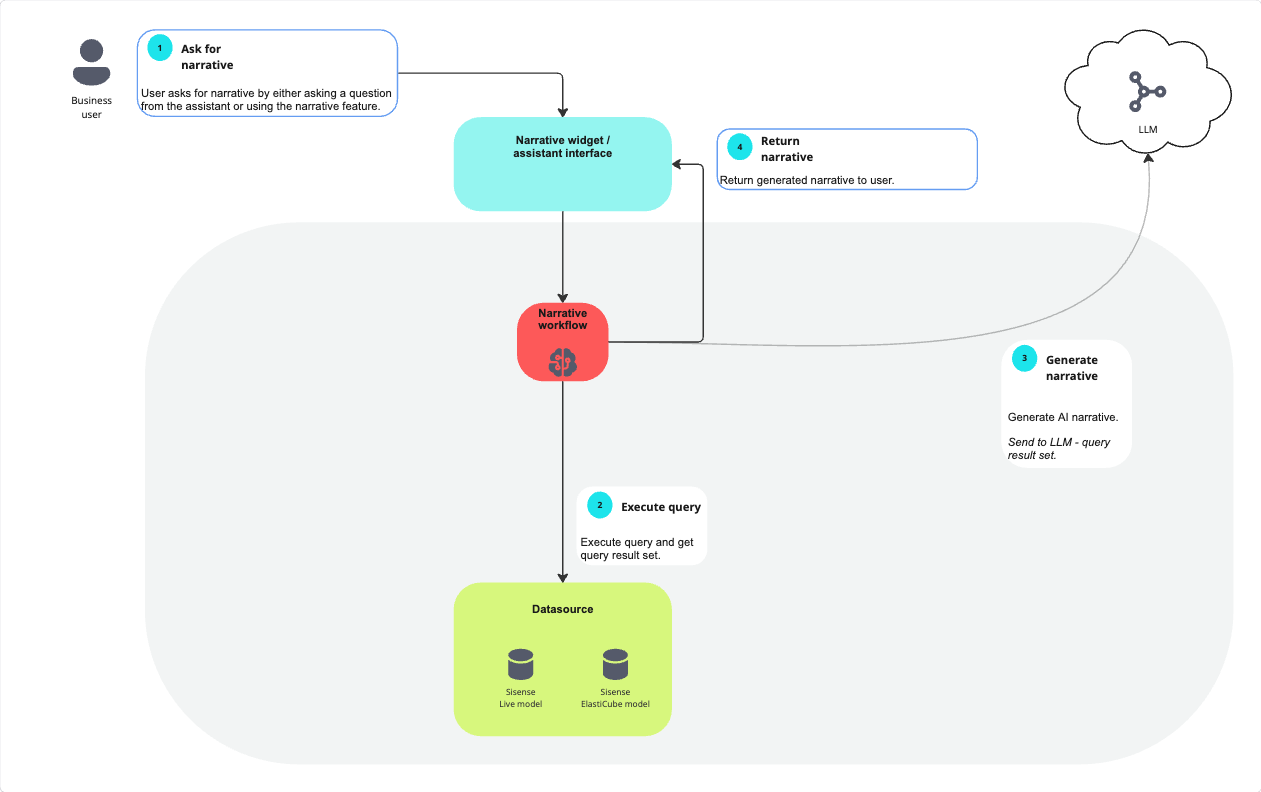
Narrative is a cloud-linked feature; it requires an LLM.
Data sent to the LLM:
-
Aggregated query results
When a business user requests a narrative, either by asking for it through the assistant interface or by using the narrative feature, the request is sent to the narrative workflow. The narrative workflow first executes a query against the connected datasource, which may be either a Sisense Live model or an ElastiCube, and retrieves the resulting dataset. This dataset is then sent to the configured external Large Language Model (LLM), via a secure API call. The LLM generates the AI-powered narrative text based on the query results. The generated narrative is returned to the narrative interface, which delivers it back to the user. In this process, all query execution and data retrieval occur within Sisense, while narrative generation happens externally in the LLM environment.
Semantic Enrichment
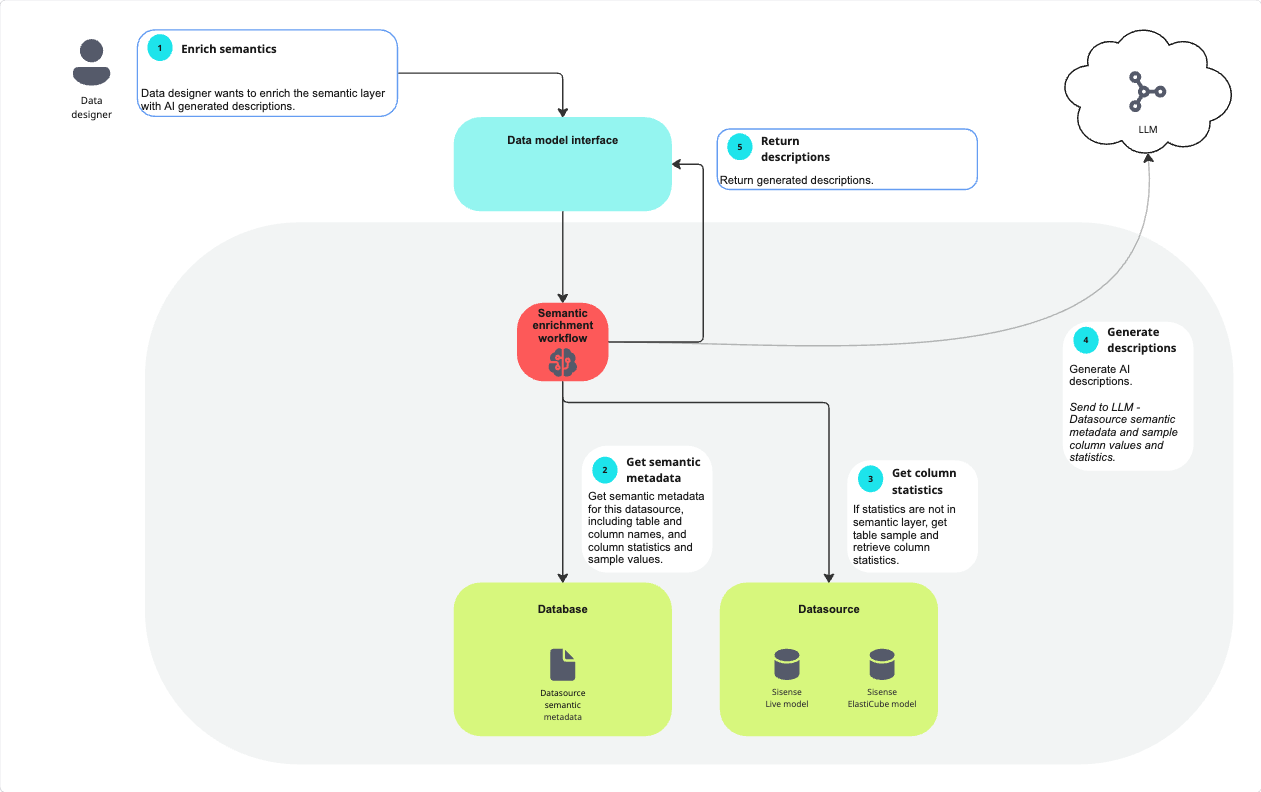
Semantic Enrichment is a cloud-linked feature; it requires an LLM.
Data sent to the LLM:
-
Datasource semantic metadata (e.g., table names, column names, relationships and data types)
-
Sample column values & statistics (e.g., uniqueness, row count and range)
When a data designer initiates semantic enrichment to enhance the semantic layer with AI-generated descriptions, the request is sent through the Data Model interface to the Semantic Enrichment workflow. The workflow first retrieves the datasource’s semantic metadata from the database, including table and column names, existing descriptions, and any available column statistics and sample values. If column statistics are not already stored in the semantic layer, the workflow queries the datasource, either a Sisense Live model or an ElastiCube, to gather a table sample and compute the necessary column statistics. This combined metadata and statistical information is then securely sent to the configured external Large Language Model (LLM) via API. The LLM generates AI-based descriptions for the datasource elements, which are returned to the Data Model interface and provided back to the data designer for review and application.